FIXONIC
SellSavedMy Fixonic
Official iFixit API visual reference

Sky 6.0Q Rear Camera Replacement

If the device is having poor back camera...

iFixit Library Sky 6.0Q Easy 10 minutes Guide 116583
Open the authorised source
Licensed iFixit integration

This attributed iFixit guide is displayed through Fixonic's recorded commercial API permission. iFixit remains the independent source and author of the procedure.

Guide overview

Before you begin

If the device is having poor back camera performance, consider replacing the back camera of the Sky 6.0Q phone. Replacement of the backcamera of the device can be needed if the camera is not working, giving blurry or dark images, has lens damage, or if the lens is exposed to water. The design of the Sky 6.0Q phone makes accessing the back camera difficult, so it is necessary to be careful when removing the back plates and to not lose the small screws. It is recommended to use a magnetic work board to keep the screws from rolling away and are always on hand once the battery is replaced. Although removing the back camera is not hazardous, be careful of disrupting other components that could be hazardous while replacing.

Step 1

Repair step

  • Use the #00 Phillips screwdriver to remove the two 3 mm screws at the bottom of the backplate.
  • Pry off the back plate with the spudger.
Step 2

Repair step

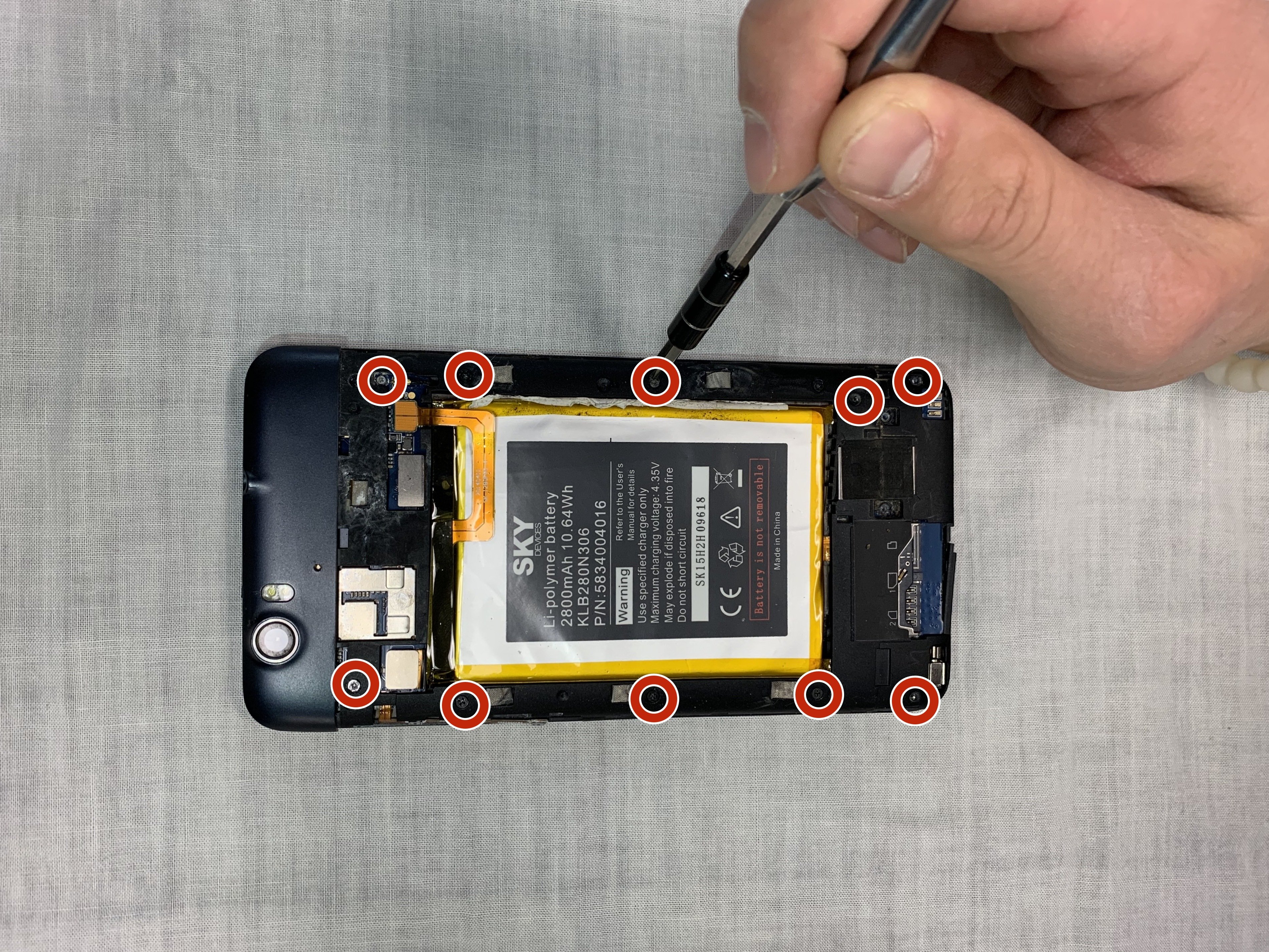
  • After removing back panel, remove all ten 3mm screws with the #00 Phillips screwdriver from the black plastic casing so it can be removed.
Step 3

Repair step

  • Use the plastic opening tool to help pry up the plastic backing.
  • Once loose, remove the plastic backing to expose underlying electronic components.
Step 4

Repair step

  • Disconnect the electronic adapter connecting the camera to the top mother board.
  • Once disconnected, remove the camera and replace with new piece. If necessary, use the spudger to help remove the camera.
  • To reattach back camera electronic connection, gently press piece back in place.