FIXONIC
SellSavedMy Fixonic
Official iFixit API visual reference

Sony Vaio PCG-41216L Hard Drive Replacement

If the laptop is having boot up issues or a...

iFixit Library Sony Vaio PCG-41216L Moderate 4 minutes Guide 119391
Open the authorised source
Licensed iFixit integration

This attributed iFixit guide is displayed through Fixonic's recorded commercial API permission. iFixit remains the independent source and author of the procedure.

Guide overview

Before you begin

If the laptop is having boot up issues or a potentially failing drive, then use this guide to replace the hard drive.

Step 1

Repair step

  • Flip the laptop over to begin the process.
  • Make sure the laptop is turned off and unplugged from the power cable.
Step 2

Repair step

  • Remove the two 7mm Phillips #1 screws holding the battery cover.
Step 3

Repair step

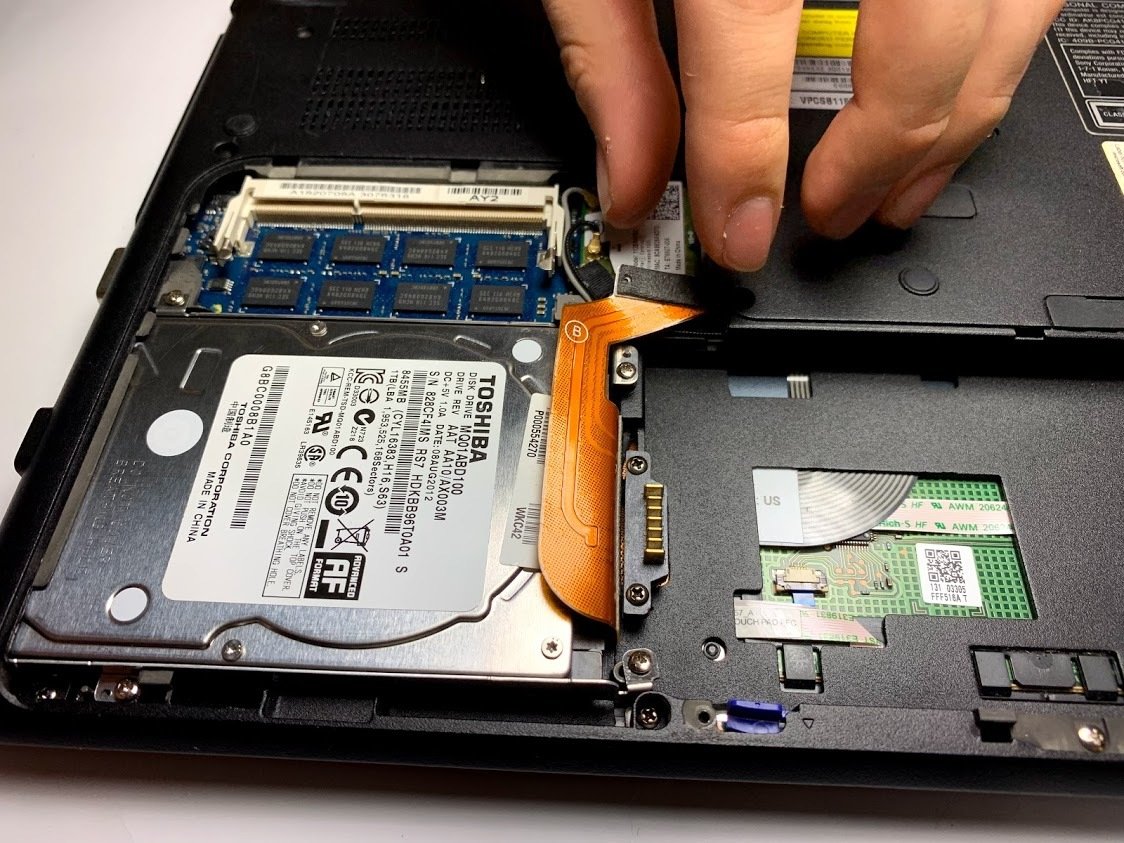
  • Peel off the ribbon cable, starting at the top by the wifi card.
Step 4

Repair step

  • Remove all of the 7mm Phillips #1 casing screws around the hard drive.
Step 5

Repair step

  • Pull the hard drive out, then remove the 3mm Phillips screws that connect the hard drive to the casing.