FIXONIC
SellSavedMy Fixonic
Official iFixit API visual reference

Toshiba Satellite L55-A CMOS Battery Replacement

This guide shows how to remove and replace the...

iFixit Library Toshiba Satellite L55-A Moderate 10 - 20 minutes Guide 125493
Open the authorised source
Licensed iFixit integration

This attributed iFixit guide is displayed through Fixonic's recorded commercial API permission. iFixit remains the independent source and author of the procedure.

Guide overview

Before you begin

This guide shows how to remove and replace the CMOS battery for the Toshiba L55 laptop. The battery is a standard CR2032 lithium coin cell.

Step 1

Remove the RAM cover

  • Before you begin, be sure to power down your laptop.
  • Flip the laptop over so that the back cover is facing up.
  • Unscrew the captive Phillips screw securing the RAM cover.
Step 2

Repair step

  • Lift up the edge of the RAM cover and remove it.
Step 3

Disconnect the ethernet connector cable

  • Use an opening tool to pry up the ethernet connector cable from its socket near the RAM module.
  • Disconnect the cable.
  • During reassembly, make sure you re-insert this connector right-side-up. The connector is keyed to plug in only one orientation, so if it doesn't slide into place easily, turn it around and try the other way.
Step 4

Remove the back cover

  • Remove the thirteen 6.8 mm long Phillips screws securing the back cover.
Step 5

Repair step

  • Insert the point of an opening pick in the seam between the SuperMultiDrive and the rest of the back cover.
  • Push the SuperMultiDrive's lip away from the back cover to disconnect the drive.
  • Slide the drive out of the bay and remove it from the laptop.
Step 6

Repair step

  • The back cover is still held in place by plastic clips.
  • Insert the point of an opening pick into the back cover seam near the ethernet port.
  • Twist the pick to release the plastic clips along the edge.
Step 7

Repair step

  • Grasp the loosened back case edge with your hand and lift it slowly away from the laptop. The remaining clips should release with ease.
  • If you meet significant resistance, stop and check for forgotten screws.
  • Remove the back cover.
  • To reinstall the back cover, align the cover and press along the edges to snap the clips back in place.
Step 8

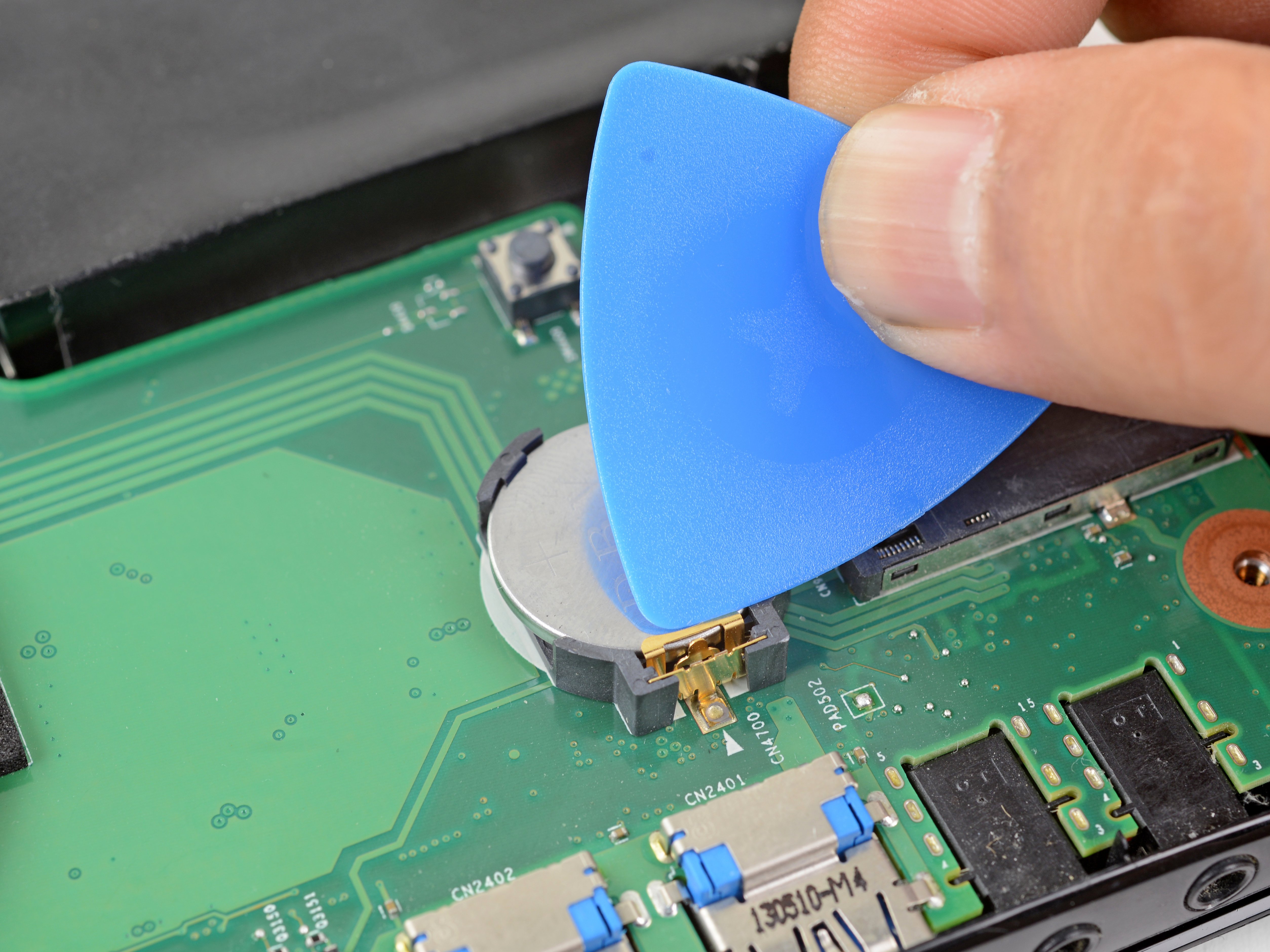
Remove the coin cell

  • Use your fingernail or an opening pick to push the gold metal clip off of the top of the coin cell.
  • Pry the coin cell out of its holder and remove it.
  • To install a replacement battery, align the battery and press it firmly into the holder until the battery snaps into position.