FIXONIC
SellSavedMy Fixonic
Official iFixit API visual reference

ACER Aspire 7750G-6645 Motherboard Replacement

Having a hard time with your Acer Aspire...

iFixit Library ACER Aspire 7750G-6645 Moderate 30 minutes Guide 128411
Open the authorised source
Licensed iFixit integration

This attributed iFixit guide is displayed through Fixonic's recorded commercial API permission. iFixit remains the independent source and author of the procedure.

Guide overview

Before you begin

Having a hard time with your Acer Aspire 7750G-6645? Does your laptop have an unusual burning smell, freezes, or overheating? This may mean that your motherboard is in failing mode and needs to be replaced immediately. This guide will provide steps to follow to remove the motherboard from the laptop. Be sure to power off the device before beginning any repairs.

Step 1

Repair step

  • Remove the six 2.5mm Phillips #0 screws from the back of the laptop.
  • Flip the laptop over carefully.
Step 2

Repair step

  • Remove the framing that encases the keyboard.
  • Next remove the keypad.
Step 3

Repair step

  • Remove the single 2.5mm Phillips #0 screw.
  • Remove the silver plating above the fan.
  • Pull out the fan.
Step 4

Repair step

  • Disconnect the ribbon strip from the motherboard by removing the two 2.5mm Phillips #0 screws.
Step 5

Repair step

  • Disconnect the cables plugged into the motherboard.
Step 6

Repair step

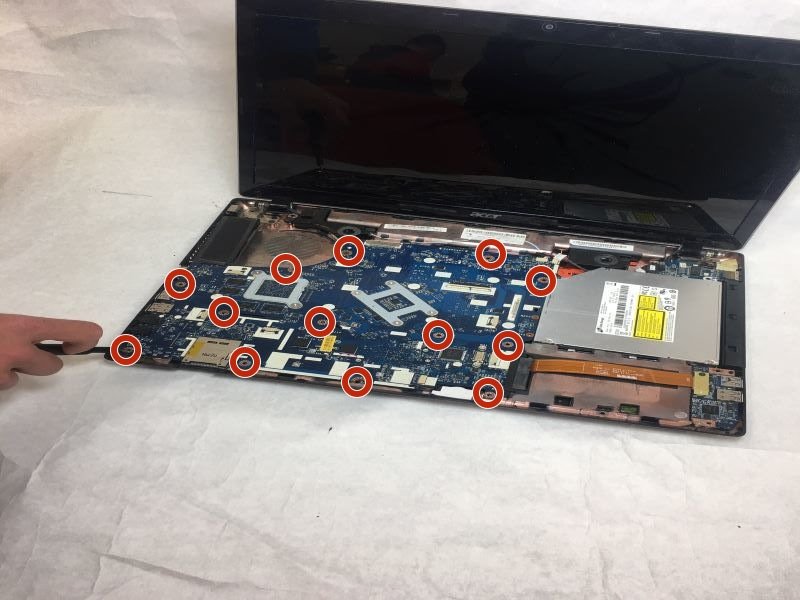
  • Remove the thirteen 2.5mm Phillips #0 screws connecting the motherboard to the body.
  • Remove the motherboard from the laptop body.