FIXONIC
SellSavedMy Fixonic
Official iFixit API visual reference

Microsoft Surface Pen Tip Replacement

This pen is Microsoft Surface pen (3UY-00001)....

iFixit Library Microsoft Tablet Very easy 3 minutes Guide 134577
Open the authorised source
Licensed iFixit integration

This attributed iFixit guide is displayed through Fixonic's recorded commercial API permission. iFixit remains the independent source and author of the procedure.

Guide overview

Before you begin

This pen is Microsoft Surface pen (3UY-00001). It is really easy to get break especially tip. If you are trying to buy a new Microsoft Surface pen, it will be over $100. But if you know how to replace this tip, it’s only $20! check this out how to replace this tip. This pen is the same as Bluetooth, so it may not work properly if you touch it incorrectly. This is really easy if you follow the steps.

Step 1

Repair step

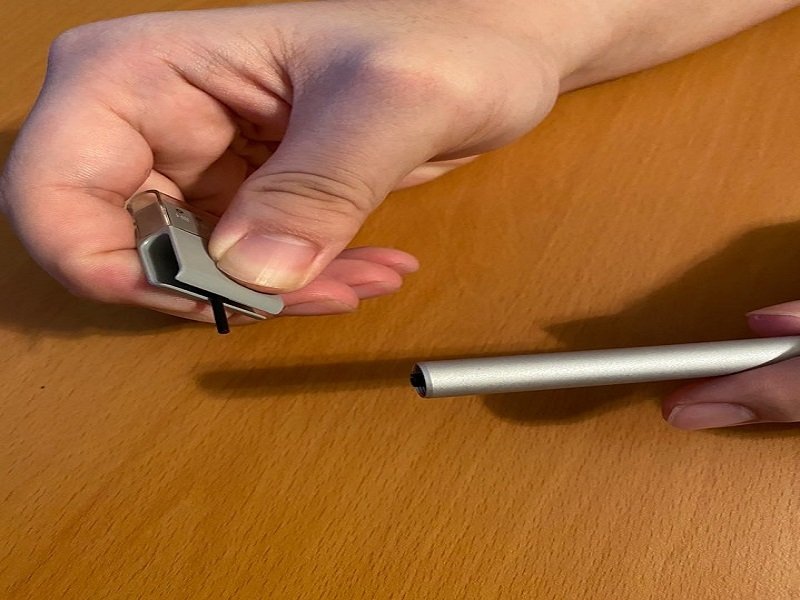
  • Order the Microsoft Surface Pen tip replacement kit.
  • Hold your pen at an angle and unscrew the top part of the pen.
Step 2

Repair step

  • Extract the tip now that it is fully exposed.
  • When you extract the tip, make sure don't do it too hard. The inside of the pen can be broken.
Step 3

Repair step

  • After you extract the tip, roll the tissue on toothpick.
  • I recommend cutting the tissue in half.
Step 4

Repair step

  • Clean the inside of the top detachable part of the pen with a toothpick covered with tissue.
  • Make sure there is no residue on the edge.
Step 5

Repair step

  • Choose the tip that you would like to use and insert in a hole.
Step 6

Repair step

  • Screw the detachable part of the pen back on.