FIXONIC
SellSavedMy Fixonic
Official iFixit API visual reference

Dell Latitude 7390 (2-in-1) Fan Replacement

If you need to repair or replace the fan...

iFixit Library Dell Latitude 7390 Moderate 7 - 15 minutes Guide 148513
Open the authorised source
Licensed iFixit integration

This attributed iFixit guide is displayed through Fixonic's recorded commercial API permission. iFixit remains the independent source and author of the procedure.

Guide overview

Before you begin

If you need to repair or replace the fan component in the Dell Latitude 7390, this guide shows you step-by-step how to access it. Prior to starting this repair, be sure to turn off your laptop and unplug from the power adapter.

Step 1

Repair step

  • Orient your Dell Latitude 7390 laptop so that it is facing towards you as if you're going to open it.
Step 2

Repair step

  • Flip your laptop over so that the bottom is facing up.
Step 3

Repair step

  • Using your Phillips #1 screwdriver, remove the eight 6 mm screws around the border of the bottom panel.
Step 4

Repair step

  • Using an opening tool or picks, work your way around the periphery and pry the back case off.
Step 5

Repair step

  • Finally, lift the back panel off to uncover the inside of your Dell Latitude 7390.
Step 6

Repair step

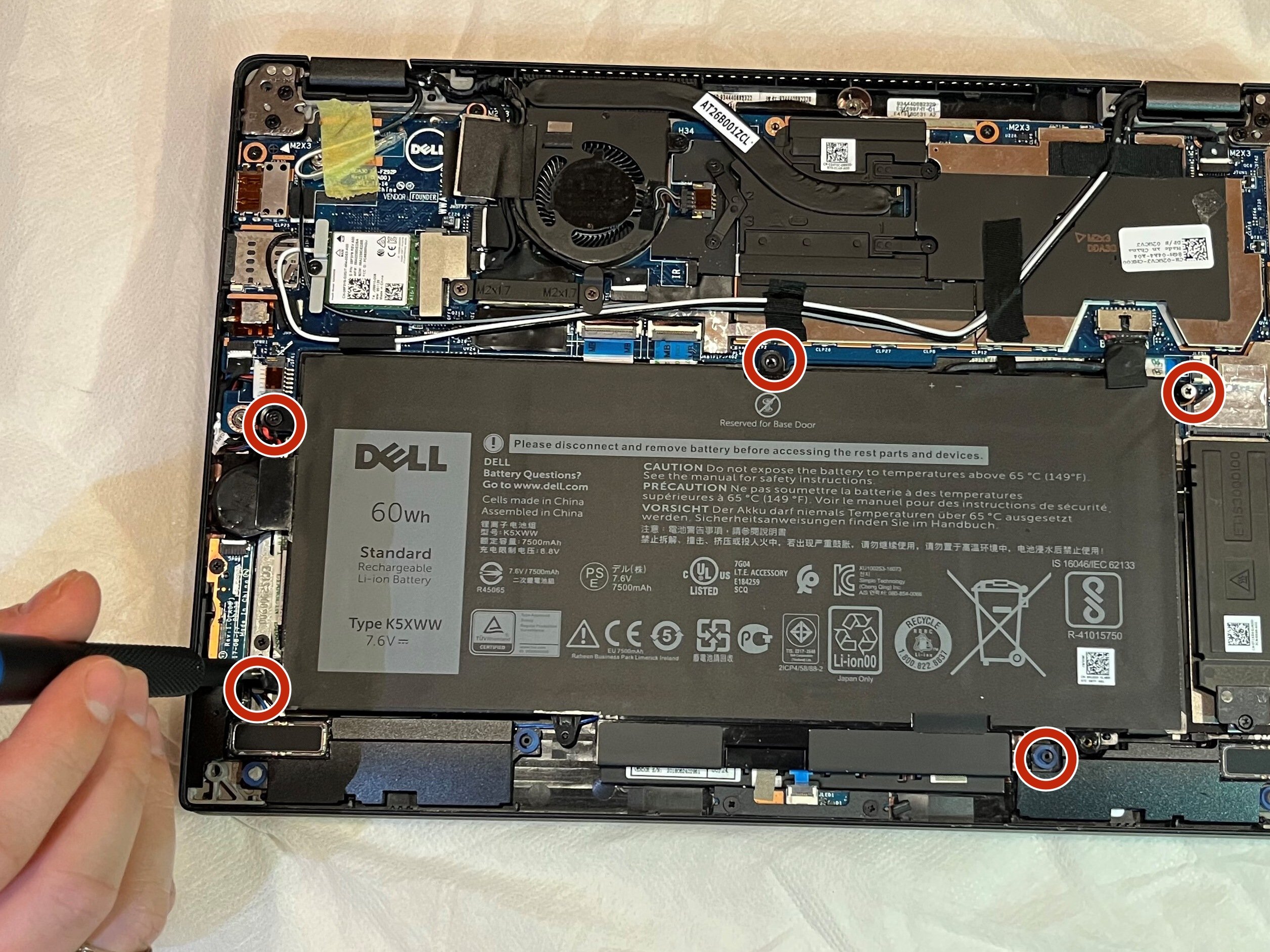
  • Make sure the laptop is turned OFF and unplugged from the power adapter before taking the battery out.
  • Use the Phillips #1 screwdriver to remove the five 6 mm screws holding the battery in place along the edges of the battery.
Step 7

Repair step

  • Be careful not to break the connector by pulling too hard on the black tab.
  • Pull the black tab on the top of the connector to unplug the battery from the motherboard.
Step 8

Repair step

  • Carefully lift the battery out of the laptop.
Step 9

Repair step

  • Remove the five black screws holding the fan and heatsink in place using the Phillips #0 screwdriver.
Step 10

Repair step

  • Use tweezers or your fingers to disconnect the fan connector.
Step 11

Repair step

  • Remove the fan from the case.