FIXONIC
SellSavedMy Fixonic
Official iFixit API visual reference

Honeywell HT900C Motor Replacement

There are a number of potential causes if your...

iFixit Library Fan Moderate 10 - 15 minutes Guide 155311
Open the authorised source
Licensed iFixit integration

This attributed iFixit guide is displayed through Fixonic's recorded commercial API permission. iFixit remains the independent source and author of the procedure.

Guide overview

Before you begin

There are a number of potential causes if your Honeywell HT900C fan does not start when you turn it on, including the fan motor being damaged from overuse, the fan being misaligned, etc. The fan motor is the most common culprit because it drives the rest of the fan. Our instructions will guide you through disassembling the old motor and installing the new one. All that is required is a screwdriver and some lubricant, both of which can be found in almost every home.

Step 1

Repair step

  • Remove the six 15 mm screws securing the fan's frame to its outer ring on the back using a Phillips #1 screwdriver.
  • Due to the small size of the screw holes, a long and thin screwdriver may be necessary.
Step 2

Repair step

  • To gain access to the fan's inner workings, gently pull the blade cover away from the main body.
Step 3

Repair step

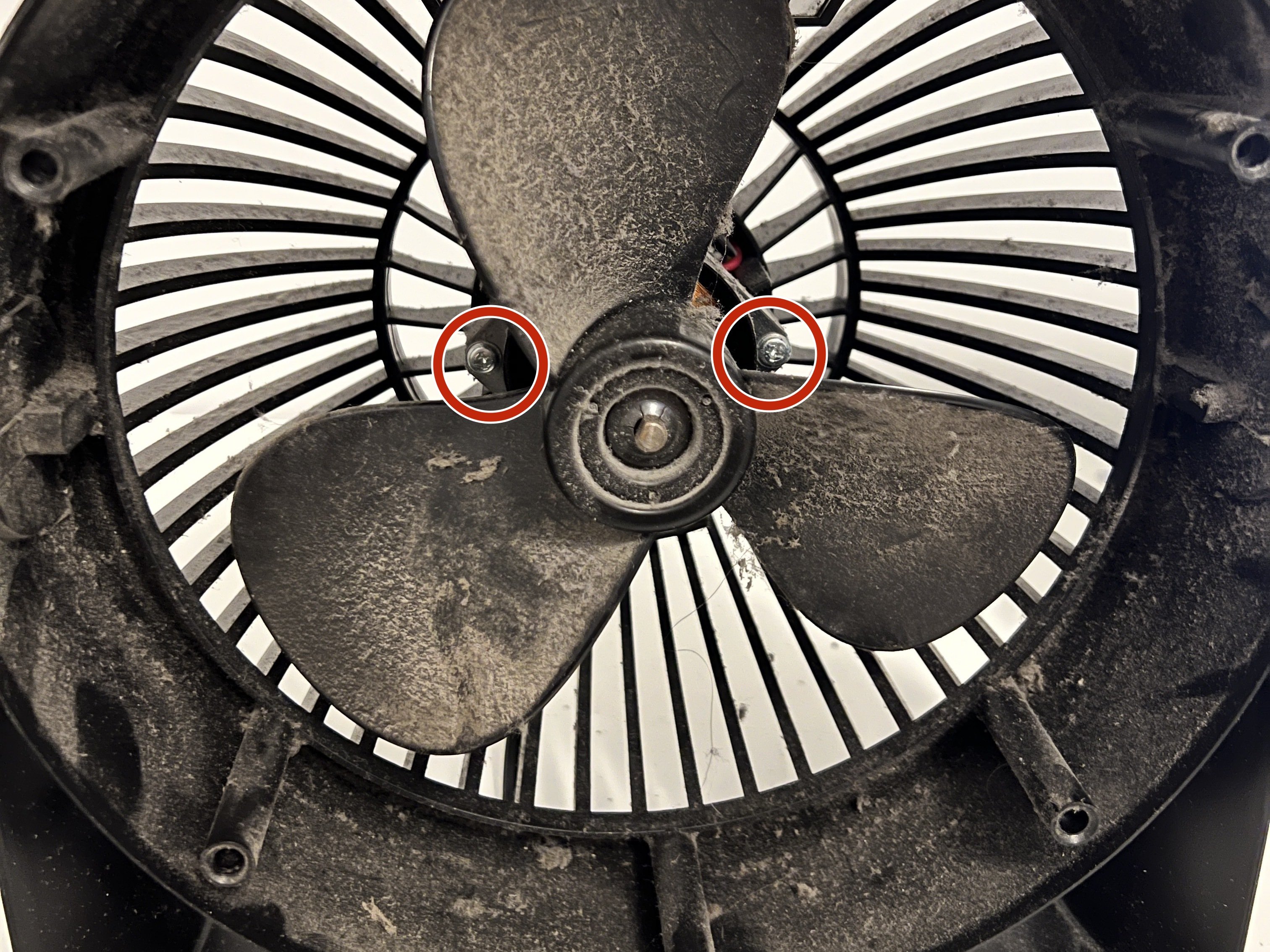
  • Remove the two 36 mm screws from the metal plate located behind the blades using a Phillips #1 screwdriver.
  • The screws can be hard to remove so you may need to twist the screwdriver harder and screws can be removed easily.
Step 4

Repair step

  • Carefully pull the motor it out of its resting position and tilt it forward to access the back of the motor.
Step 5

Repair step

  • Remove two 10 mm screws from the motor's back using a Phillips #1 screwdriver.
Step 6

Repair step

  • Remove the 20 mm screws beside the fan blade using a Phillips #1 screwdriver.
  • The screws are attached to two parts of the motor so it can easily fall off after removing the screws.
Step 7

Repair step

  • Carefully remove the circular motor from the square holder.
  • The circular motor is still connected to the fan blades.
Step 8

Repair step

  • Remove the metal washer from the axle.
Step 9

Repair step

  • Replace the old motor with a new one, and you're done!
  • Using the lubricant to easily put the new motor back.
  • Always double-check that the screws are securely in place.