FIXONIC
SellSavedMy Fixonic
Official iFixit API visual reference

How to Factory Reset a Sonos Move

Welcome to the iFixit guide (non official) on...

iFixit Library Sonos Move Very easy 5 - 10 minutes Guide 163117
Open the authorised source
Licensed iFixit integration

This attributed iFixit guide is displayed through Fixonic's recorded commercial API permission. iFixit remains the independent source and author of the procedure.

Guide overview

Before you begin

Welcome to the iFixit guide (non official) on performing a factory reset for the Sonos Move smart speaker. If you're experiencing issues with your Sonos Move or planning to sell or give it away, a factory reset is a crucial step to erase all personal data and return the device to its original settings. This step-by-step guide will walk you through the process, ensuring a smooth and hassle-free reset.

Step 1

Take the Device off of its charging base

  • Take the Device off of its charging base.
  • And place it down close to the charging dock for later.
Step 2

Power down the device

  • Completely Power down the device by holding down the power button for at least 5 seconds.
  • You should here a sound to confirm that the device is off.
Step 3

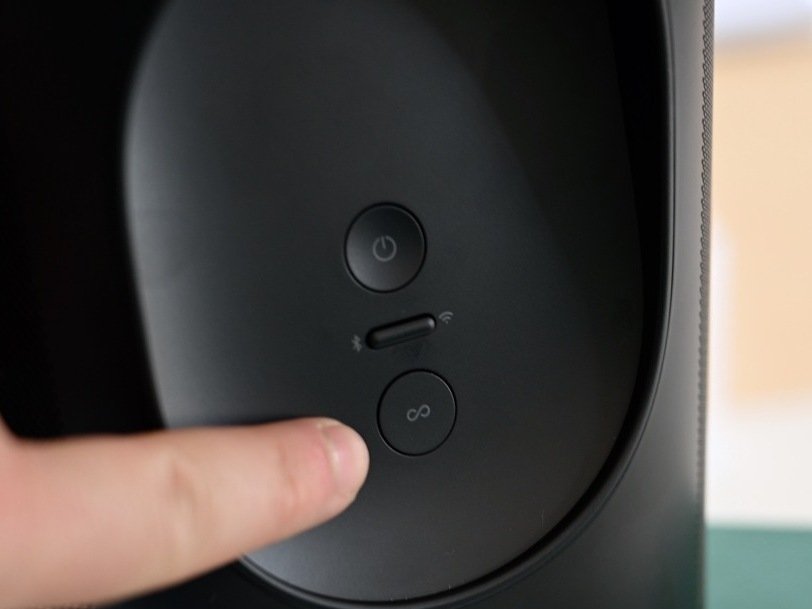
Hold the Join button while reconnecting to dock

  • Hold the join button while putting the move back on its charging base.
  • Make sure the charging dock is connected to power.
  • Make sure you hold the join button until the device starts flashing amber and white.
Step 4

The device has now been reset

  • With in a few seconds the device should start flashing green.
  • This means the device is now reset and ready to pair to.