
FIXONIC
SellSavedMy Fixonic
Official iFixit API visual reference

Acer Aspire 5 A515-46-R3UB SSD Replacement

An SSD is the component of a computer that...

iFixit Library Acer Aspire 5 A515-46-R3UB Moderate 20 - 40 minutes Guide 168097
Open the authorised source
Licensed iFixit integration

This attributed iFixit guide is displayed through Fixonic's recorded commercial API permission. iFixit remains the independent source and author of the procedure.

Guide overview

Before you begin

An SSD is the component of a computer that stores all of your digital content. A faulty SSD in your ACER Aspire 5 A515-46-R3UB can be the cause of many errors throughout the device. Follow this guide to fix and replace your hard drive with a wide range of applications. Refer to the ACER Aspire 5 A515-46-R3UB Troubleshooting page for additional information. Before you begin, turn off your laptop and disconnect from the charger.
Step 1

Repair step

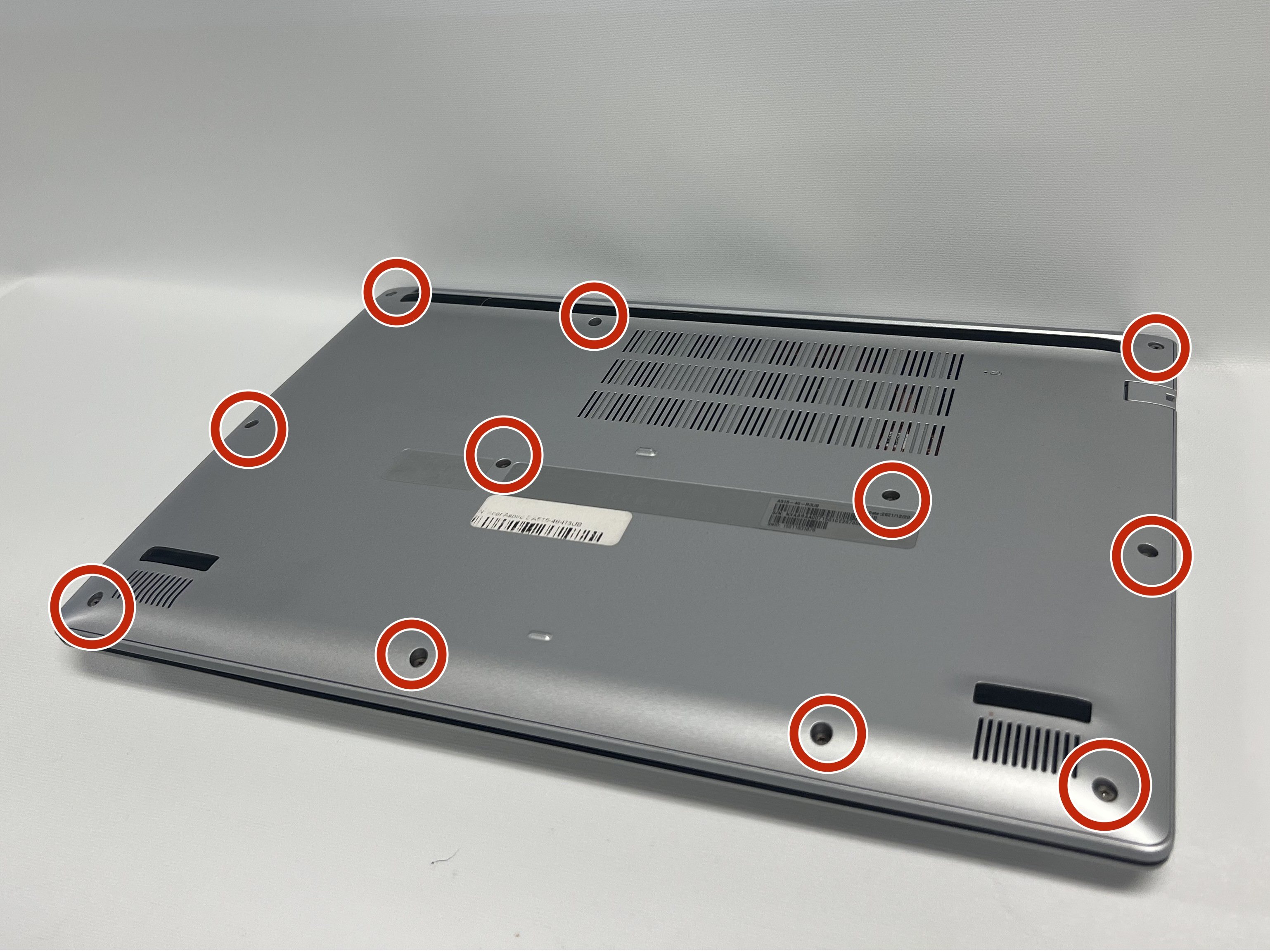
  • Use a JIS #1 screwdriver to remove eleven 6.7 mm screws from the bottom cover.
Step 2

Repair step

  • Use an opening tool and picks to pry the bottom cover from the laptop.
  • Work your way around the perimeter of the bottom cover, releasing any clips before you remove the bottom case.
  • Remove the bottom case.
Step 3

Repair step

  • Remove the two pieces of tape from the battery and the battery connector.
  • Save the tape for reassembly.
Step 4

Repair step

  • Use the plastic opening tool to carefully push on each side of the connector and remove it from the socket.
Step 5

Repair step

  • Lift up the battery and remove it from the bottom case of the laptop.
Step 6

Repair step

  • Use a JIS #1 screwdriver to remove the single 3.2 mm mounting screw from the SSD.
  • When you remove the screw, the SSD card will pop up slightly.
Step 7

Repair step

  • Gently slide the SSD from the socket.