
FIXONIC
SellSavedMy Fixonic
Official iFixit API visual reference

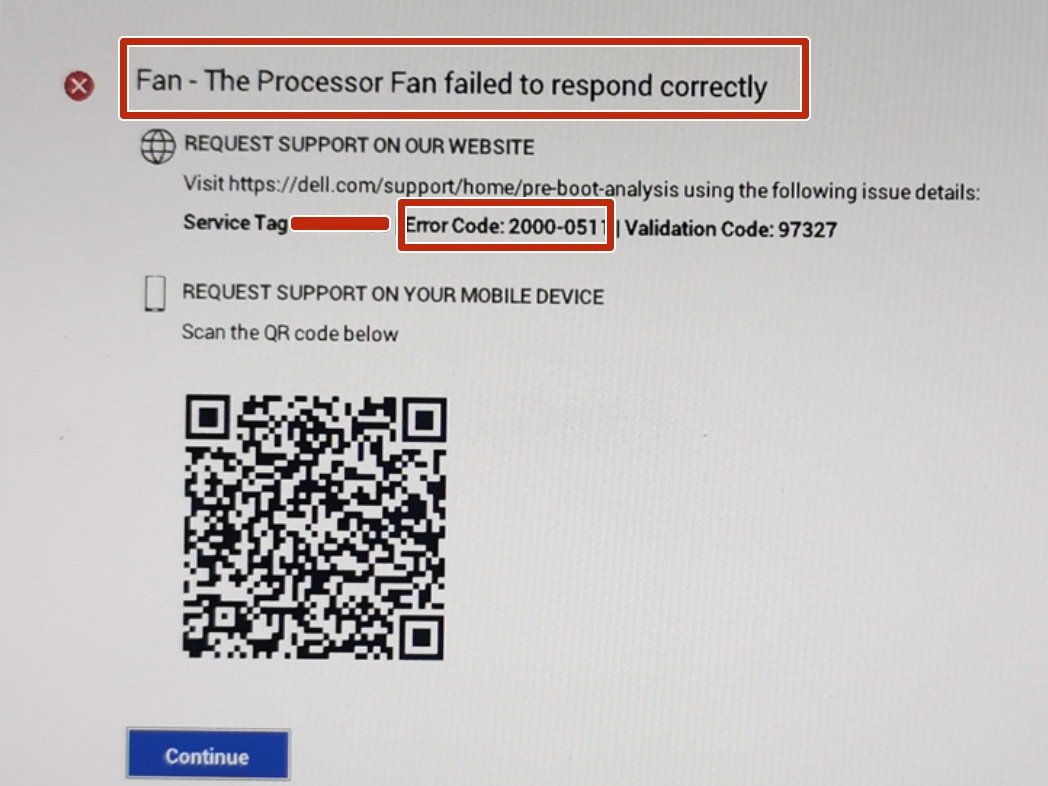
Dell Latitude 5310 - The Processor Fan failed to respond correctly

(1) Here is a possible solution for fixing the...

iFixit Library Dell Latitude 5310 Moderate 10 - 30 minutes Guide 169240
Open the authorised source
Licensed iFixit integration

This attributed iFixit guide is displayed through Fixonic's recorded commercial API permission. iFixit remains the independent source and author of the procedure.

Guide overview

Before you begin

Here is a possible solution for fixing the error "The Processor Fan failed to respond correctly"Often fans are dusted and dirty and therefore they wirk no longer properly.Symptomatics would be an extremely slow work, sudden switching off by overheating, etc
Step 1

Performing an error diagnosis

  • Turn off your computer
  • Turn on and constantly tapping F12
  • in the pre-boot menu choose "Diagnostics".
  • The Troubleshooting solved the specified error code 2000-0511.
Step 2

Remove the backcover

  • place the laptop upside down on a soft, clean surface to avoid scratching
  • locate the screws (in this case 8)
  • use the screwdriver
  • 'Note: the screws are designe to stay attached in the back cover even after being unscrewed. This prevents loss.'
  • use the opening tool to open the back cover starting on the hinge areas. then move slowly around the edges
  • lift the open areas with your hand (lightly!) and slowly work using the tension along the edges.
Step 3

remove fan and clean

  • Remove the fan connector
  • Loosen 2x M2 screws remove the fan
  • Loosen 3x small slotted screws
  • Remove all possible dirt and dust (With the help of tweezers, compressed air, brush)
  • Try to rotate the Fan with your fingers slowly