FIXONIC
SellSavedMy Fixonic
Official iFixit API visual reference

Acer Nitro 5 AN515-44-R70B Fan Replacement

This guide will walk you through the steps of...

iFixit Library Acer Nitro Moderate 20 minutes Guide 169723
Open the authorised source
Licensed iFixit integration

This attributed iFixit guide is displayed through Fixonic's recorded commercial API permission. iFixit remains the independent source and author of the procedure.

Guide overview

Before you begin

This guide will walk you through the steps of replacing a malfunctioning or non-functional fan in an Acer Nitro 5 AN515-44-R70B. If your laptop is generating excessive heat or noise, especially during resource-intensive activities like gaming, it could be a sign of a fan-related issue.

Step 1

Repair step

  • Make sure the laptop is off and unplugged before beginning the fan replacement
  • Flip the laptop upside down so that the bottom is facing up.
Step 2

Repair step

  • Use the Phillips #0 screwdriver to remove the eleven M2.5x6.0 size screws holding the back cover in place.
Step 3

Repair step

  • Carefully remove the back shell from the device.
  • Do not be too forceful as you could damage the shell.
Step 4

Repair step

  • For extra caution slide out the battery cable from its connector using your fingers.
Step 5

Repair step

  • Using your fingers, slide out the two fan cables from their connectors.
Step 6

Repair step

  • Remove the gaffer tape next to the fan.
Step 7

Repair step

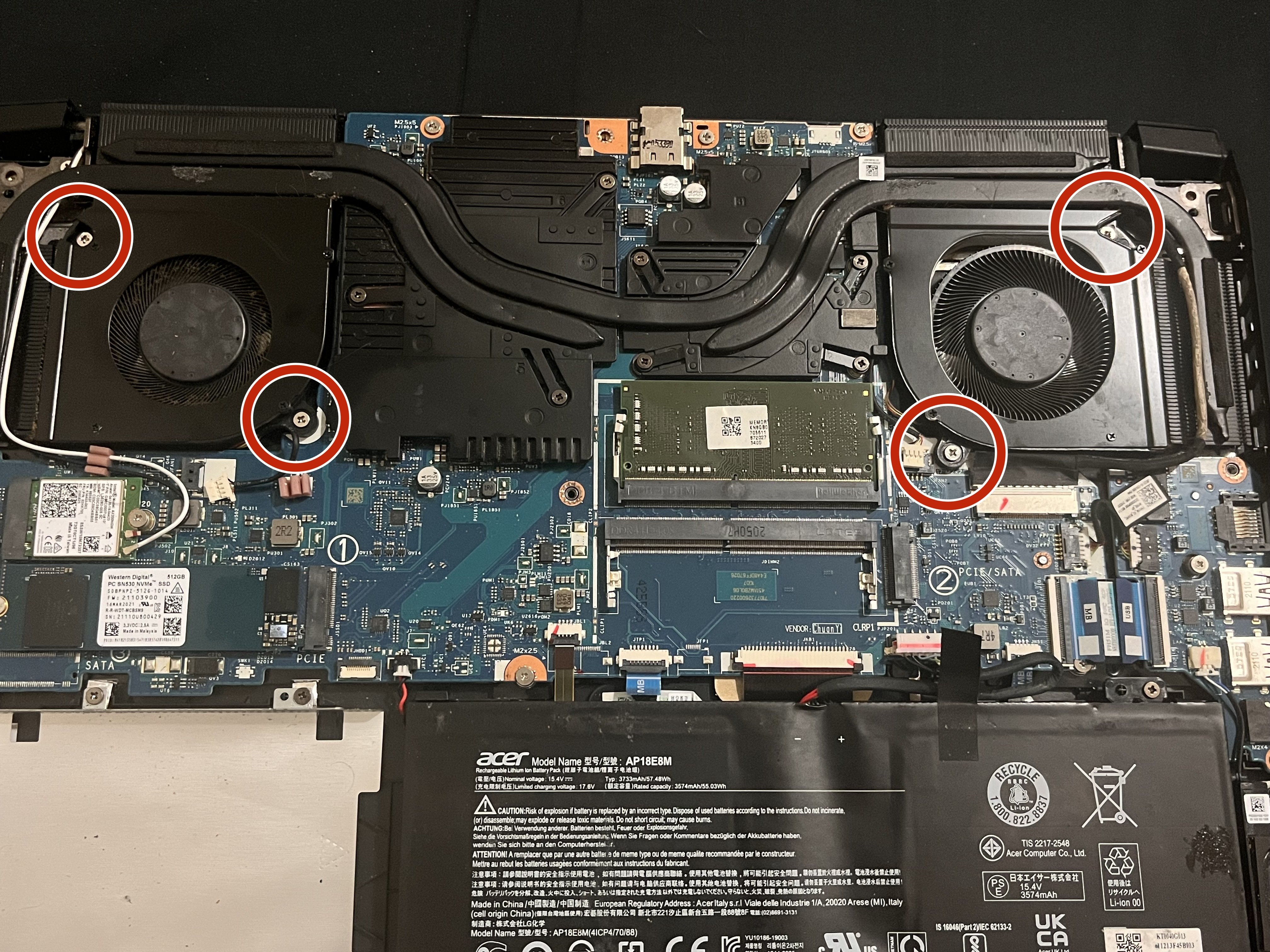
  • Use the Phillips #0 screwdriver to remove the four M2.5x6.0 size screws holding the fan assembly in place.
  • You can now remove the old fans and replace them with new ones.