FIXONIC
SellSavedMy Fixonic
Official iFixit API visual reference

Philips SBA1060 Circuit Board Replacement

The circuit board is the large, flat, green...

iFixit Library Philips Portable Speaker SBA1610 37 Moderate 10 - 20 minutes Guide 19090
Open the authorised source
Licensed iFixit integration

This attributed iFixit guide is displayed through Fixonic's recorded commercial API permission. iFixit remains the independent source and author of the procedure.

Guide overview

Before you begin

The circuit board is the large, flat, green rectangle in the middle of the device. This guide will detail the steps in how to replace the circuit board.

Step 1

Repair step

  • Remove the back cover by sliding it off.
  • Remove the 3 AAA batteries.
Step 2

Repair step

  • Unscrew the nine exterior screws on the back panel using a PH0-size Philips-head screwdriver.
  • A larger screwdriver head and more force may be required for damaged screws.
  • Remove the triangular end piece by pulling it straight off.
Step 3

Repair step

  • Remove the colored grill by sliding it off in the direction of the removed end piece.
  • Pry off the back battery panel with the plastic opening tool.
  • Be careful to avoid tearing any wires.
Step 4

Repair step

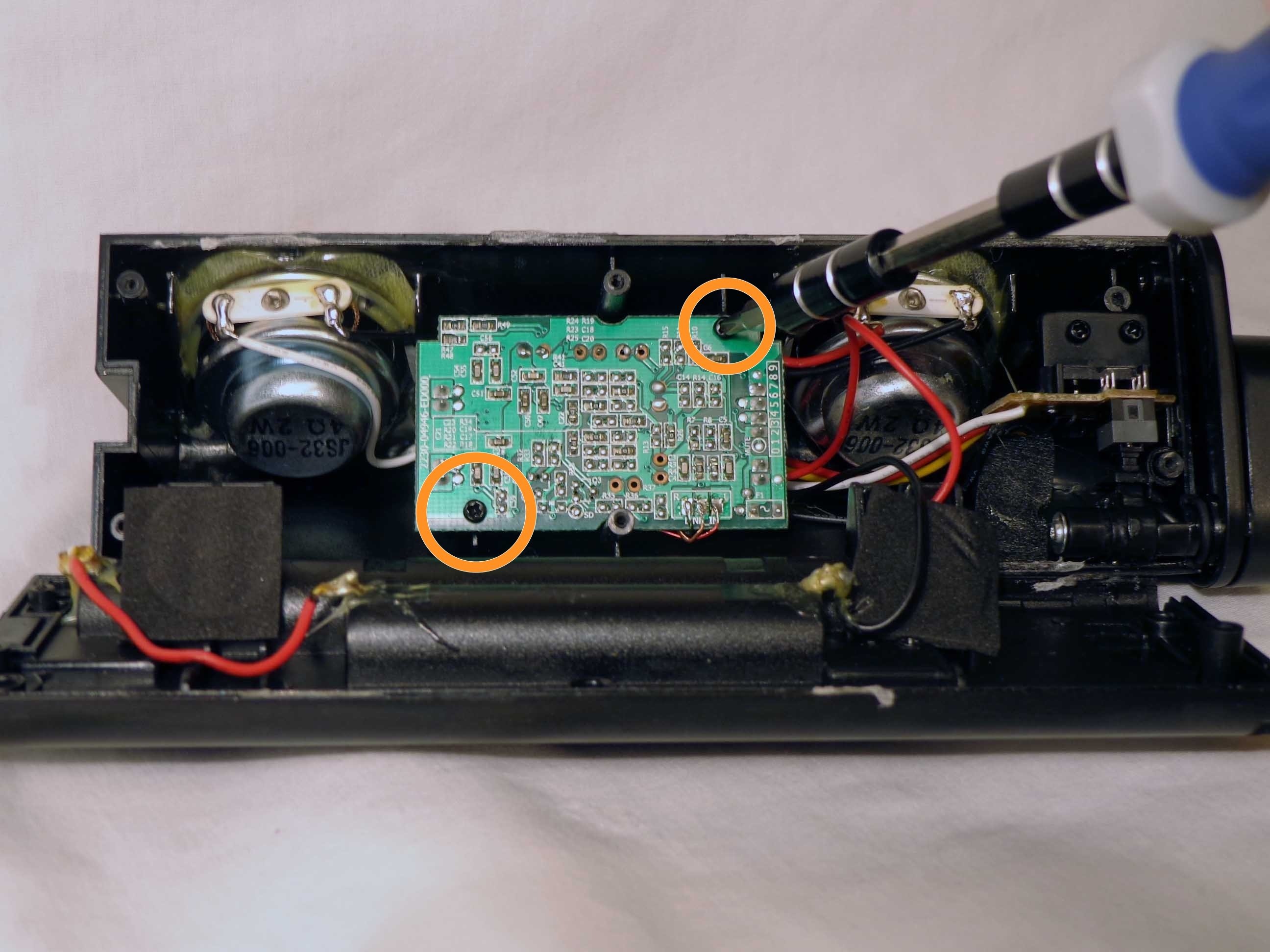
  • Remove the two screws on opposite ends of the circuit board with the PH0 size philips head screw driver.
  • Remove the damaged circuit board from the device.
Step 5

Repair step

  • Remove the battery plug from the circuit board by pulling out the plugs to fully remove back panel.
  • Remove the speaker plugs from the circuit board by pulling out the plugs. They are located on opposite sides of the circuit board.
  • NOTE: When reassembling, note that the speaker with the red wire goes to the red plug, and the speaker with the white wire goes to the adjacent white plug.
  • Remove the light plug from the circuit board.
  • NOTE: This plug is twice as wide as the speaker and battery plugs.
  • Reassemble the device.