FIXONIC
SellSavedMy Fixonic
Official iFixit API visual reference

Logitech UE Megablast Speaker Replacement

Is your UE Megablast (Model number: 984-000911)...

iFixit Library Logitech UE Megablast Moderate 55 minutes - 2 hours Guide 200695
Open the authorised source
Licensed iFixit integration

This attributed iFixit guide is displayed through Fixonic's recorded commercial API permission. iFixit remains the independent source and author of the procedure.

Guide overview

Before you begin

Is your UE Megablast (Model number: 984-000911) speaker low or completely not working at all which could potentially cause battery issues? This guide will show you how to replace the speaker in your UE Megablast speaker. Check the troubleshooting pages first to confirm that your Megablast needs a new speaker. Before beginning this repair, make sure to power off your speaker, unplug it from the charger, and not be in close proximity to water.

Step 1

Repair step

  • Turn the silver D-ring on one end of the speaker counterclockwise with your fingers to remove it.
Step 2

Repair step

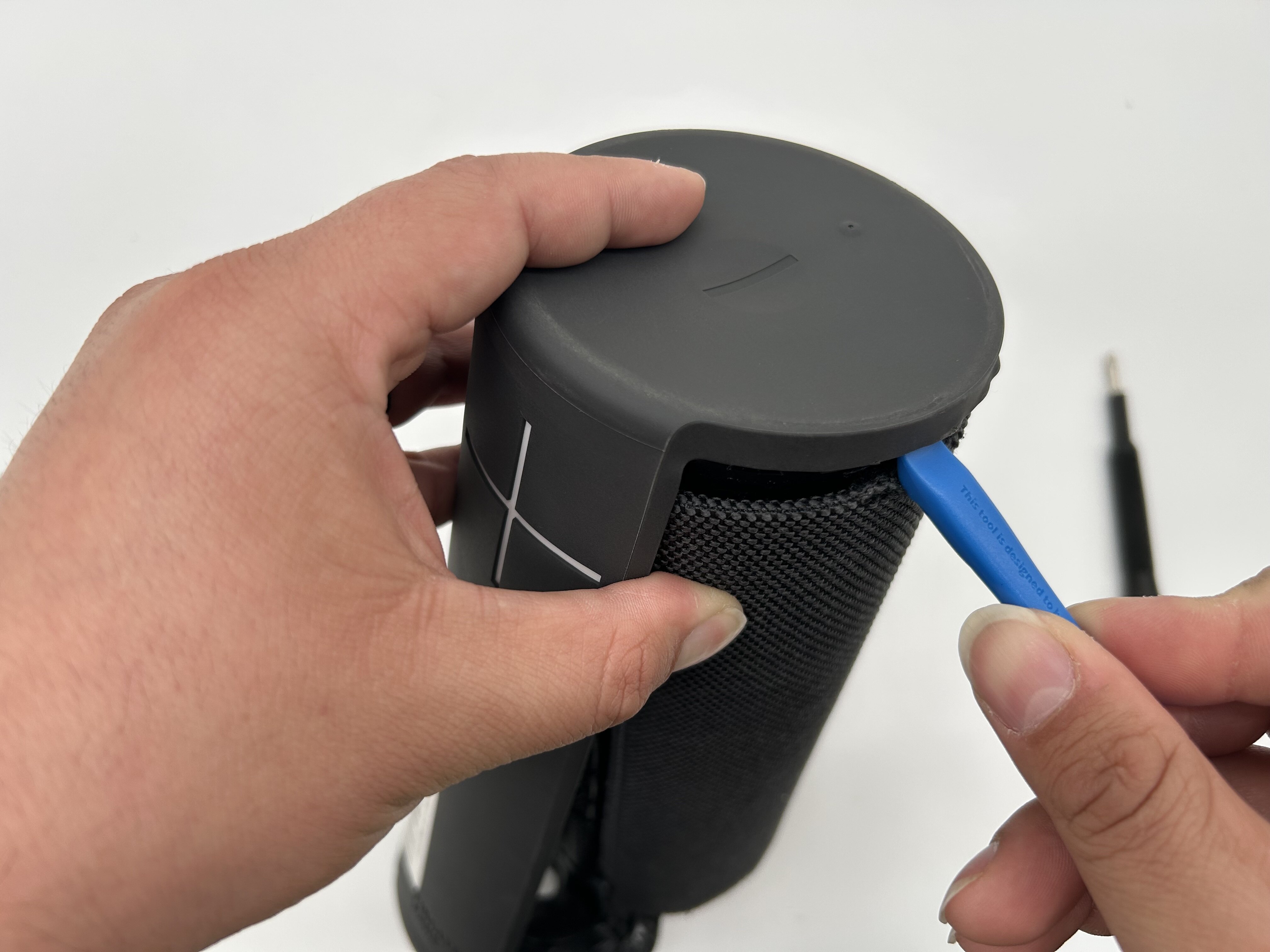
  • Insert the blue iFixit opening tool between the rubber end and the mesh.
  • Pry the rubber end to remove it.
Step 3

Repair step

  • Use a Phillips #2 screwdriver to remove the four 12 mm screws.
Step 4

Repair step

  • Use the iFixit opening tool to gently pry the black plastic cover out of the end of the speaker.
Step 5

Repair step

  • Gently pull the 3400 mAh rechargeable lithium-ion battery straight out of the speaker.
Step 6

Repair step

  • Use an iFixit opening tool to gently lift a corner of the rubber spine.
  • Start from a side that is easier to grip (usually the bottom or the side).
  • Slowly pull the rubber upward around each button, checking for any adhesive spots or clips and detaching them carefully.
Step 7

Repair step

  • Use an iFixit opening tool to gently pry up the lip at the top of the spine, starting at the 9 o’clock position, to release the latch.
  • Continue to pry around the edge of the lid towards the 6 and 3 o’clock positions until it is completely removed.
  • Carefully remove the spine with the top and bottom ends attached to avoid tearing it.
Step 8

Repair step

  • Use a pair of tweezers to pull down the flaps near the top back of the speaker.
Step 9

Repair step

  • Gently use a pair of tweezers to lift a corner of the fabric mesh from the frame.
  • Slide an opening pick along the edges to slowly free the mesh, being careful not to tear it.
Step 10

Repair step

  • Gently slide an opening pick or tweezers under the top edge of the fabric mesh to detach it from the top and bottom of the speaker.
Step 11

Repair step

  • Carefully remove the mesh and set it aside for reassembly.
Step 12

Repair step

  • Use the iFixit opening tool to release the clips along the seam, starting at a corner or the side
  • Gently lift the plastic cover away from the body to expose the speaker underneath.
Step 13

Repair step

  • Use the Phillips #2 screwdriver to remove the Bluetooth button board from the Megablast.
  • Lift the Bluetooth button PCB and slide a thin, ESD-safe pry tool or angled tweezers under the metal neck of the connector (as close to the head as possible) and lift straight up from the board.
  • Remove the PCB and set it aside.
Step 14

Repair step

  • Using a screwdriver, gently push out the hooked portions of the metal rods from the Megablast.
Step 15

Repair step

  • Use a pair of tweezers to grip the end and gently pull each rod straight out, avoiding any bending or twisting.
  • Set the rods aside.
Step 16

Repair step

  • Use the iFixit opening tool to release the clips holding the speaker in place.
Step 17

Repair step

  • Before you remove the speaker, pull the white speaker connector from the motherboard.
  • Remove the speakers from the device.