
FIXONIC
SellSavedMy Fixonic
Official iFixit API visual reference

Lenovo ThinkPad T460p Battery Replacement

The Lenovo T460p has an external battery that...

iFixit Library Lenovo ThinkPad T460P Very easy 1 - 2 minutes Guide 215425
Open the authorised source
Licensed iFixit integration

This attributed iFixit guide is displayed through Fixonic's recorded commercial API permission. iFixit remains the independent source and author of the procedure.

Guide overview

Before you begin

The Lenovo T460p has an external battery that supplies power during normal use, as well as an internal CMOS battery that allows the computer to store data when the computer is not powered on. This repair guide shows step by step how to replace the external main battery, which when defective makes battery life extremely short or nonexistent. Any battery with visible damage should additionally be replaced, regardless of its performance.
Step 1

Repair step

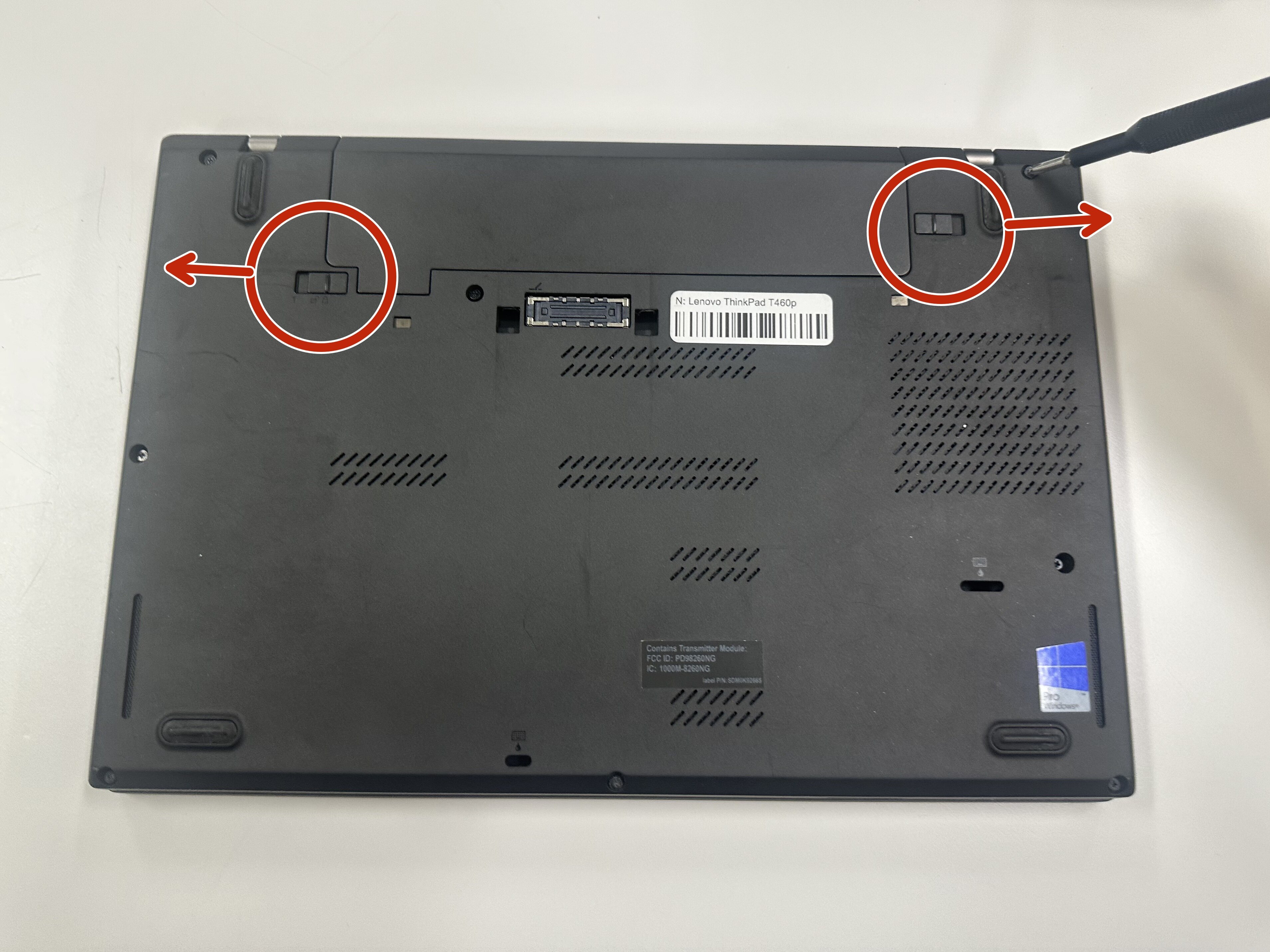
  • Ensure the computer is shut down by depressing the power button above the keyboard.
  • Slide each of the two battery locking tabs toward the closest edge.
  • Remove the battery.
  • Reinstall the new battery by simply pushing it into the battery compartment; you do not need to hold the two retaining tabs back.