FIXONIC
SellSavedMy Fixonic
Official iFixit API visual reference

PowerBook G4 Aluminum 17" 1-1.67 GHz RAM Replacement

Two RAM slots allow up to 1 GB of PC2700 RAM.

iFixit Library PowerBook G4 Aluminum 17" 1-1.67 GHz Easy 5 - 10 minutes Guide 242
Open the authorised source
Licensed iFixit integration

This attributed iFixit guide is displayed through Fixonic's recorded commercial API permission. iFixit remains the independent source and author of the procedure.

Guide overview

Before you begin

Two RAM slots allow up to 1 GB of PC2700 RAM.

Step 1

Repair step

  • Orient the computer so that the side with the line of screws on it is away from you.
  • Use your thumbs to push both battery release tabs away so that the edge of the battery lifts up.
  • Lift the battery out of the computer.
Step 2

Repair step

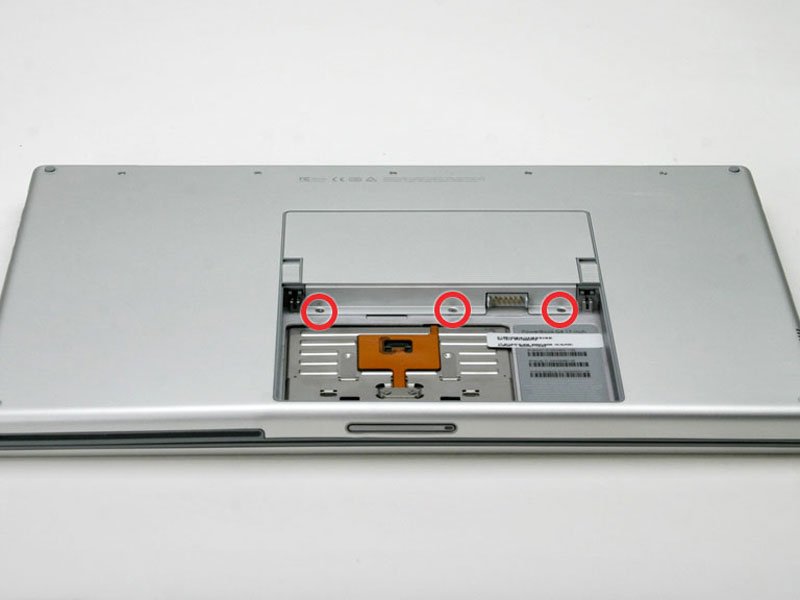
  • Remove the three identical Phillips screws from the memory door.
Step 3

Repair step

  • Lift the memory door up enough so that you can get a grip on it, and slide it toward you, pulling it away from the casing.
Step 4

Repair step

  • Release the tabs on each side of the RAM chip at the same time. These tabs lock the chip in place and releasing them will cause the chip to "pop" up.
  • Pull the chip directly out from its connectors. If there is a second RAM chip installed, pop it out in the same manner.