
FIXONIC
SellSavedMy Fixonic
Official iFixit API visual reference

Gateway SA1 Wireless Card Replacement

Attributed iFixit repair guide for Gateway SA1.

iFixit Library Gateway SA1 Moderate No estimate Guide 24957
Open the authorised source
Licensed iFixit integration

This attributed iFixit guide is displayed through Fixonic's recorded commercial API permission. iFixit remains the independent source and author of the procedure.
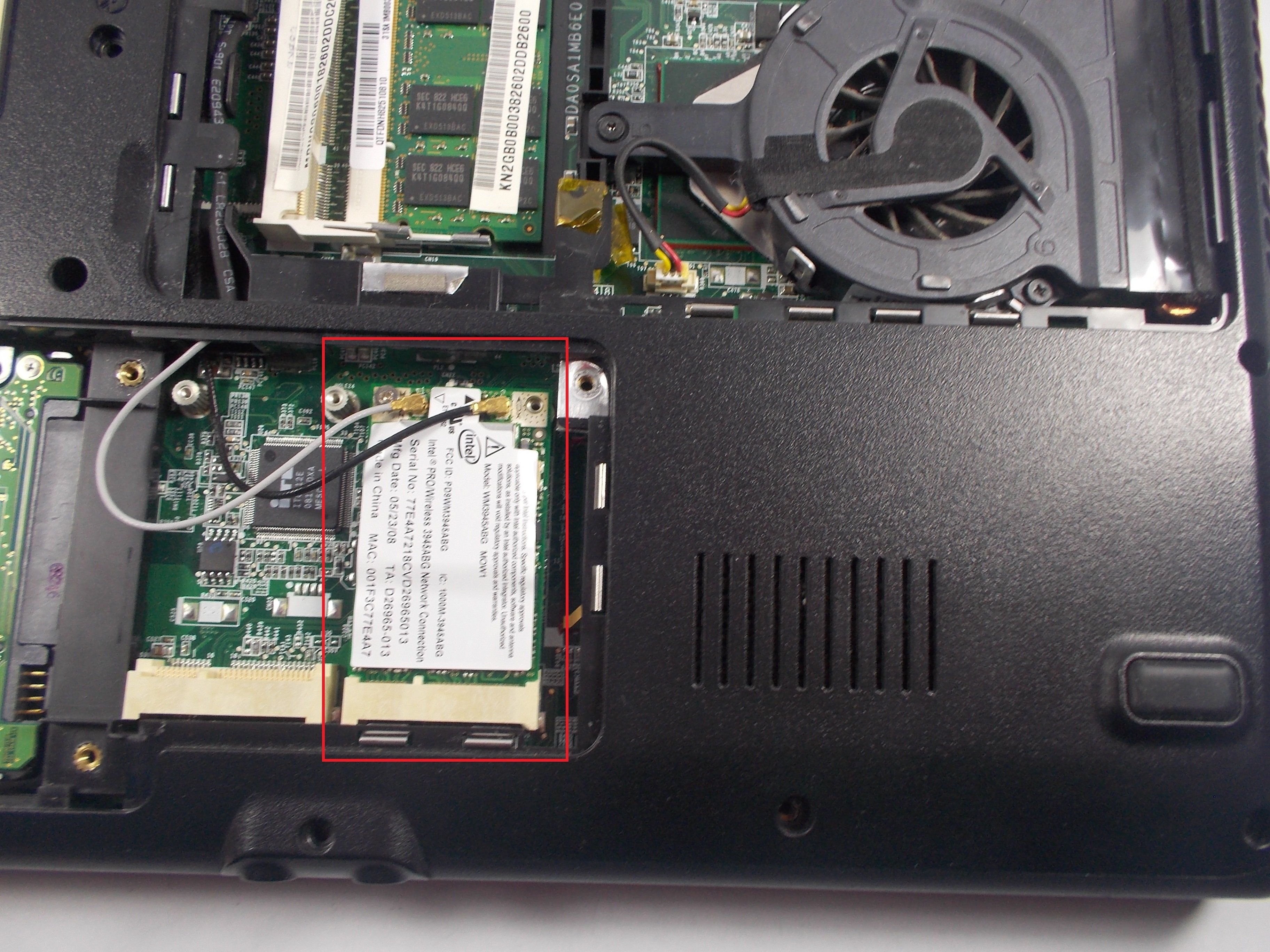
Step 1

Repair step

  • The first thing you need to do is remove the panel concealing the wireless card, by taking out the screws.
Step 2

Repair step

  • Locate the wireless card on the right side of the now removed panel.
Step 3

Repair step

  • Remove the screws in the two possible locations.
Step 4

Repair step

  • After removing the screws, gently pull upwards on the end of the wireless card until it is angled as shown.
Step 5

Repair step

  • Pull the card diretly outward from its socket, all while being mindful of the connected wires.
  • Remove the wired connections by gently pulling them diretly away from the card. Please remember where each one was connected, it will be useful for reconnecting
Step 6

Repair step

  • Reconnect wires to new wireless card and screw back into place.