FIXONIC
SellSavedMy Fixonic
Official iFixit API visual reference

BlackBerry R900M Keypad Replacement

Use this guide to replace or clean your keypad.

iFixit Library BlackBerry R900M Easy 5 - 10 minutes Guide 2968
Open the authorised source
Licensed iFixit integration

This attributed iFixit guide is displayed through Fixonic's recorded commercial API permission. iFixit remains the independent source and author of the procedure.

Guide overview

Before you begin

Use this guide to replace or clean your keypad.

Step 1

Repair step

  • Use a T9 Screwdriver to unscrew the two screws on the backside of the BlackBerry, one on the bottom left and one on the top right.
Step 2

Repair step

  • Remove the backside of the device and set aside for later use.
Step 3

Repair step

  • Remove the rubber placement pad that sits under the battery and set aside for later use. Gently fold back the battery, making sure the small plug connecting the battery to the logic board remains intact. Extra care should be taken as this part is quite delicate and easy to damage.
Step 4

Repair step

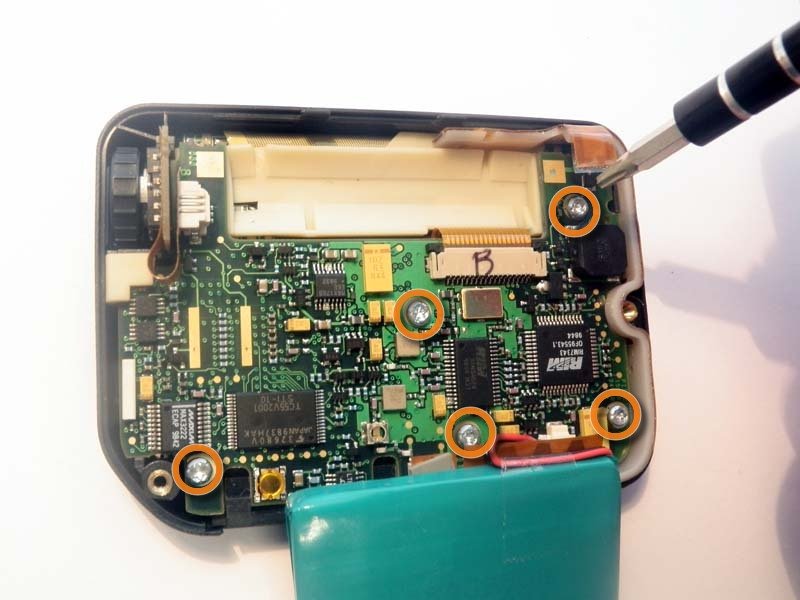
  • Use the T9 Screwdriver to remove the five visible screws: Top right, bottom right, middle center, bottom center, bottom left.
Step 5

Repair step

  • Carefully remove the board from the device by gently pushing on the screen from the front side. The battery, screen, and scroll wheel are all connected to the logic board. Be sure to support these components so they do not break.
  • Note the placement of two additional rubber pieces that cling loosely to the logic board. It is okay to let these pieces fall loose.
  • One is located below the scrollwheel.
  • Another is located behind the screen.
Step 6

Repair step

  • Flip the newly separated front portion of the casing over so that the front of the device is facing upwards, causing the keypad to fall loose.