FIXONIC
SellSavedMy Fixonic
Official iFixit API visual reference

Mac mini Mid 2010 Antenna Plate Replacement

Use this guide to replace the antenna plate...

iFixit Library Mac Mini Mid 2010 Moderate No estimate Guide 3111
Open the authorised source
Licensed iFixit integration

This attributed iFixit guide is displayed through Fixonic's recorded commercial API permission. iFixit remains the independent source and author of the procedure.

Guide overview

Before you begin

Use this guide to replace the antenna plate that serves as a mount for the antenna as well as the hard drive.

Step 1

Repair step

  • Place your thumbs in the depressions cut into the bottom cover.
  • Rotate the bottom cover counter-clockwise until the white dot painted on the bottom cover is aligned with the ring inscribed on the outer case.
Step 2

Repair step

  • Tilt the mini enough to allow the bottom cover to fall away from the outer case.
  • Remove the bottom cover and set it aside.
Step 3

Repair step

  • Remove the two 11.3 mm T6 Torx screws securing the fan to the logic board near the antenna plate.
Step 4

Repair step

  • Lift the ear of the fan nearest the RAM up off the standoff secured to the outer case.
  • If the fan doesn't separate from the standoff screw with a moderate amount of force, you can use a T6 Torx driver to simply remove this screw.
Step 5

Repair step

  • Lift the fan out of the mini for enough clearance to access its connector.
  • Carefully pull the fan cables upward to lift the fan connector up out of its socket on the logic board.
  • Remove the fan.
Step 6

Repair step

  • Remove the single 3.5 mm T6 Torx screw securing the cowling to the heat sink.
Step 7

Repair step

  • Lift the cowling from the end nearest the antenna plate.
  • Rotate the cowling away from the outer case and remove it from the mini.
Step 8

Repair step

  • Remove the following screws securing the antenna plate to the mini:
  • Two 6.6 mm T8 or T9 Torx screws
  • Two 5.0 mm T8 Torx or 2.0 mm Hex screws (either will work)
Step 9

Repair step

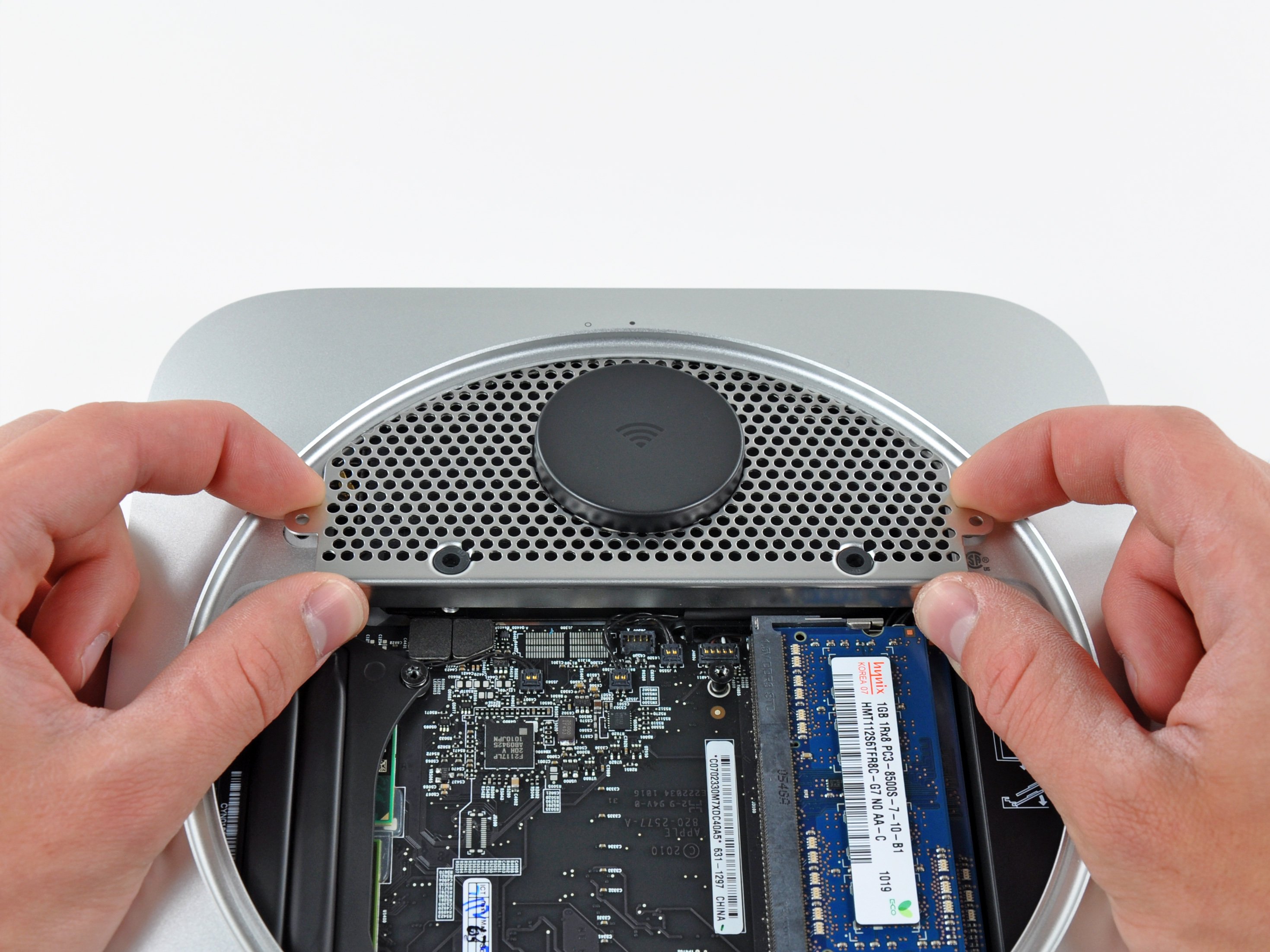
  • Slightly lift the antenna plate from the end closest to the RAM.
  • Carefully pull the antenna plate straight away from the circular rim of the outer case.
  • Do not remove the antenna plate yet. It is still attached to the AirPort/ Bluetooth board.
Step 10

Repair step

  • Use the tip of a spudger to carefully pry the antenna connector up off the AirPort/Bluetooth board.
Step 11

Repair step

  • Remove the antenna plate from the mini.