FIXONIC
SellSavedMy Fixonic
Official iFixit API visual reference

BlackBerry PlayBook USB Port Replacement

The USB port is a common issue with these...

iFixit Library BlackBerry PlayBook Difficult 25 minutes Guide 31679
Open the authorised source
Licensed iFixit integration

This attributed iFixit guide is displayed through Fixonic's recorded commercial API permission. iFixit remains the independent source and author of the procedure.

Guide overview

Before you begin

The USB port is a common issue with these devices. Our example device's USB port was completely broken off the device. The port is attached to the motherboard by two solder joints, making it easy to reattach or replace once the motherboard has been removed.

Step 1

Remove Back Panel

  • Use a plastic opening tool to pry the back panel off by inserting it in between the front and back panel.
  • There are clips that need to be released on all four sides of the device.
  • When replacing the back cover insert the bottom side first ( usb and hdmi ports stick out about 2mm ) inserting them into the covers openings will allow for easier reassembly
Step 2

Repair step

  • Remove the battery connector using either your fingers or a pair of tweezers.
Step 3

Repair step

  • Unscrew two 1.17x2.9mm Phillips screws from the white connector port.
  • Lift the battery connector away from the motherboard using a spudger.
Step 4

Repair step

  • Remove the flat-top connector coming from across the camera assembly with a spudger.
Step 5

Repair step

  • With the spudger, remove the flat-top connector coming from underneath the motherboard.
Step 6

Repair step

  • Remove the clipped ZIF data connector coming from underneath the motherboard.
  • Lift up the black plastic clip with a spudger.
  • Pull the connector out gently using tweezers.
  • Be careful to ensure that the black plastic clip has been lifted away from the connector ribbon before pulling on the connector. The clip should be loose and easy to wiggle. Removing the connector before it is unclipped can cause damage.
Step 7

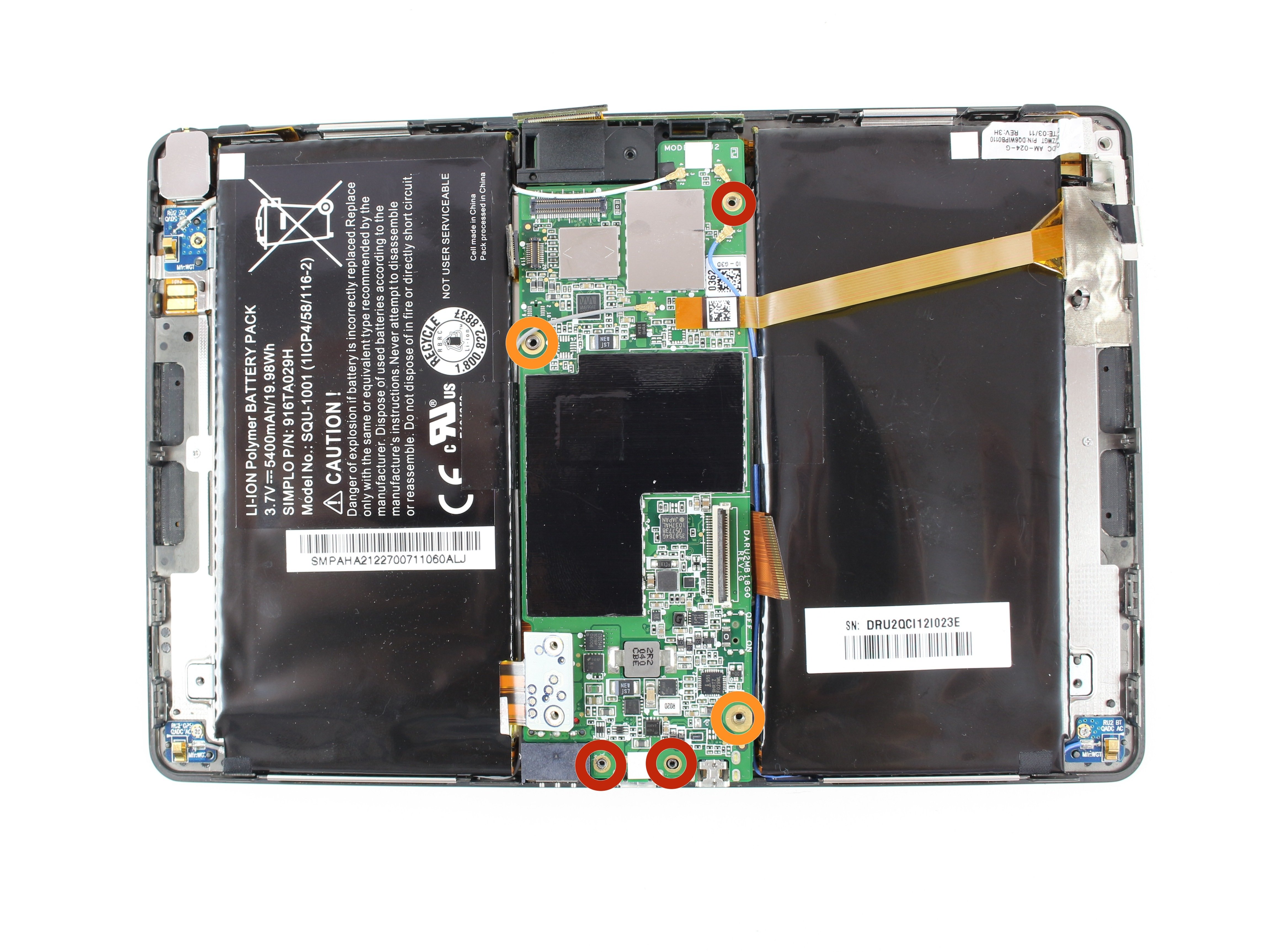
Unscrew Motherboard

  • Remove the following five screws from the motherboard.
  • Three 1.5x2.5mm Phillips screws
  • Two 1.55x2.38mm Phillips screws
Step 8

Remove Wire Leads

  • Lift all four antenna connectors from the motherboard again using the spudger.
Step 9

Remove Motherboard

  • Gently lift the motherboard away from the device. If there is any resistance, check the previous steps to ensure that all connections have been removed.
Step 10

Desolder the USB port

  • Use your soldering skills to detach the USB port from the motherboard at the following two solder joints.