
FIXONIC
SellSavedMy Fixonic
Official iFixit API visual reference

Panasonic HDC-TM15 Hand-Strap Replacement

The hand-strap of the Panasonic HDC-TM15 allows...

iFixit Library Panasonic HDC-TM15 Moderate 15 - 30 minutes Guide 39772
Open the authorised source
Licensed iFixit integration

This attributed iFixit guide is displayed through Fixonic's recorded commercial API permission. iFixit remains the independent source and author of the procedure.

Guide overview

Before you begin

The hand-strap of the Panasonic HDC-TM15 allows the user to safely handle and stabilize the camera during use. Replacing it is a straightforward process and easy to do!
Step 1

Repair step

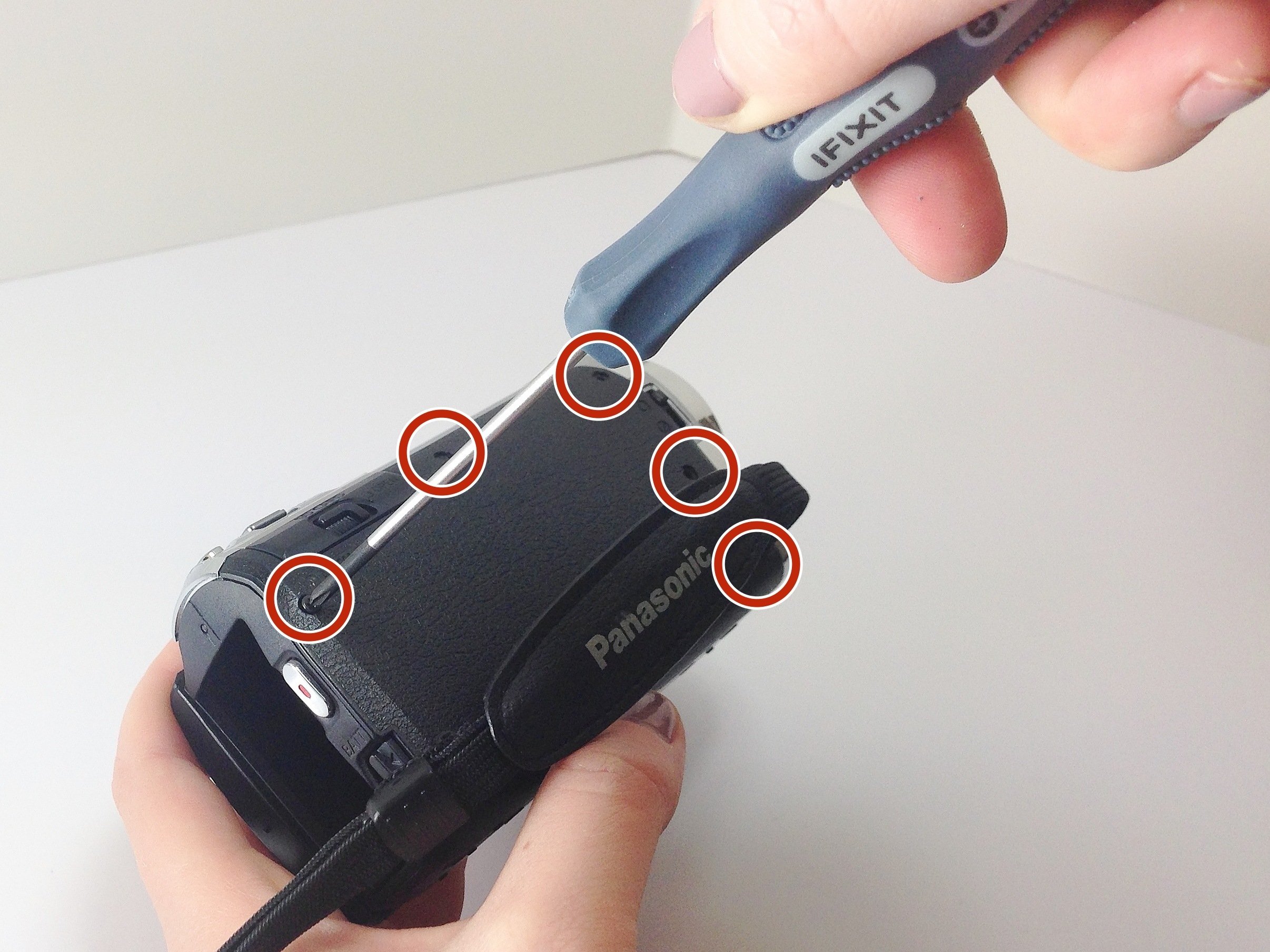
  • Using the Phillips #00 Screwdriver, unscrew the five .5 mm Phillips #00 screws on the hand-strap side of the camcorder.
Step 2

Repair step

  • Unscrew the six .5 mm Phillips #00 screws on the bottom of the camcorder.
Step 3

Repair step

  • Once all eleven screws have been removed, put your hand through the hand-strap and tug on the side cover until it comes off completely.
  • The inside of your camcorder should now be completely exposed, as shown in the photos.
Step 4

Repair step

  • For the remainder of the hand-strap replacement, you will only be working with the side cover of the camcorder.
  • Unscrew the two silver .5 mm Phillips #00 screws located in the bottom corners of the inside of the side cover. This will release the two silver plates that hold the hand-strap in place.
Step 5

Repair step

  • Remove the two silver plates from the loops of the hand-strap.
Step 6

Repair step

  • Pull the hand-strap through the holes of the side cover, until it is completely detached.
  • Set the old hand-strap aside.
Step 7

Repair step

  • During these next replacement steps, the inside of the side cover should be facing you.
  • Taking your new hand-strap, first feed the smaller loop through the bottom right hole of the side cover.
Step 8

Repair step

  • Feed the hooked end of the smaller silver plate through the first loop of the new hand-strap.
  • Slide the sliver plate into place, lining up the screw holes, and screw in tightly.
Step 9

Repair step

  • Feed the larger loop through the hole in the opposite corner of the side cover.
Step 10

Repair step

  • Feed the U-shaped silver plate through the second, larger loop of the new hand-strap in the opposite corner of the side cover.
  • Ensure the screw hole is lined up.
Step 11

Repair step

  • Re-screw the two silver screws tightly back into the silver plates.
Step 12

Repair step

  • Tug on the hand-strap to ensure it is securely in place.
  • If your new hand-strap feels secure, you can now re-attach the side cover to your camcorder.
Step 13

Repair step

  • When the side cover is securely fastened, you have completed the hand-strap replacement of your Panasonic HDC-TM15 camcorder.