
FIXONIC
SellSavedMy Fixonic
Official iFixit API visual reference

Skytex Skypad Alpha 2 Back Cover Replacement

By following this guide one is able to access...

iFixit Library Skytex Skypad Alpha 2 Easy 5 minutes Guide 50802
Open the authorised source
Licensed iFixit integration

This attributed iFixit guide is displayed through Fixonic's recorded commercial API permission. iFixit remains the independent source and author of the procedure.

Guide overview

Before you begin

By following this guide one is able to access the inside of the Skytex Skypad Alpha 2 tablet in four steps. These steps include locating and unscrewing the screws that are found at the sides of the tablet and using a plastic opening tool to separate the back case from the tablet and replace if necessary.

Step 1

Repair step

  • Power off the tablet.
  • Unplug the tablet from the power source if it is connected.
Step 2

Repair step

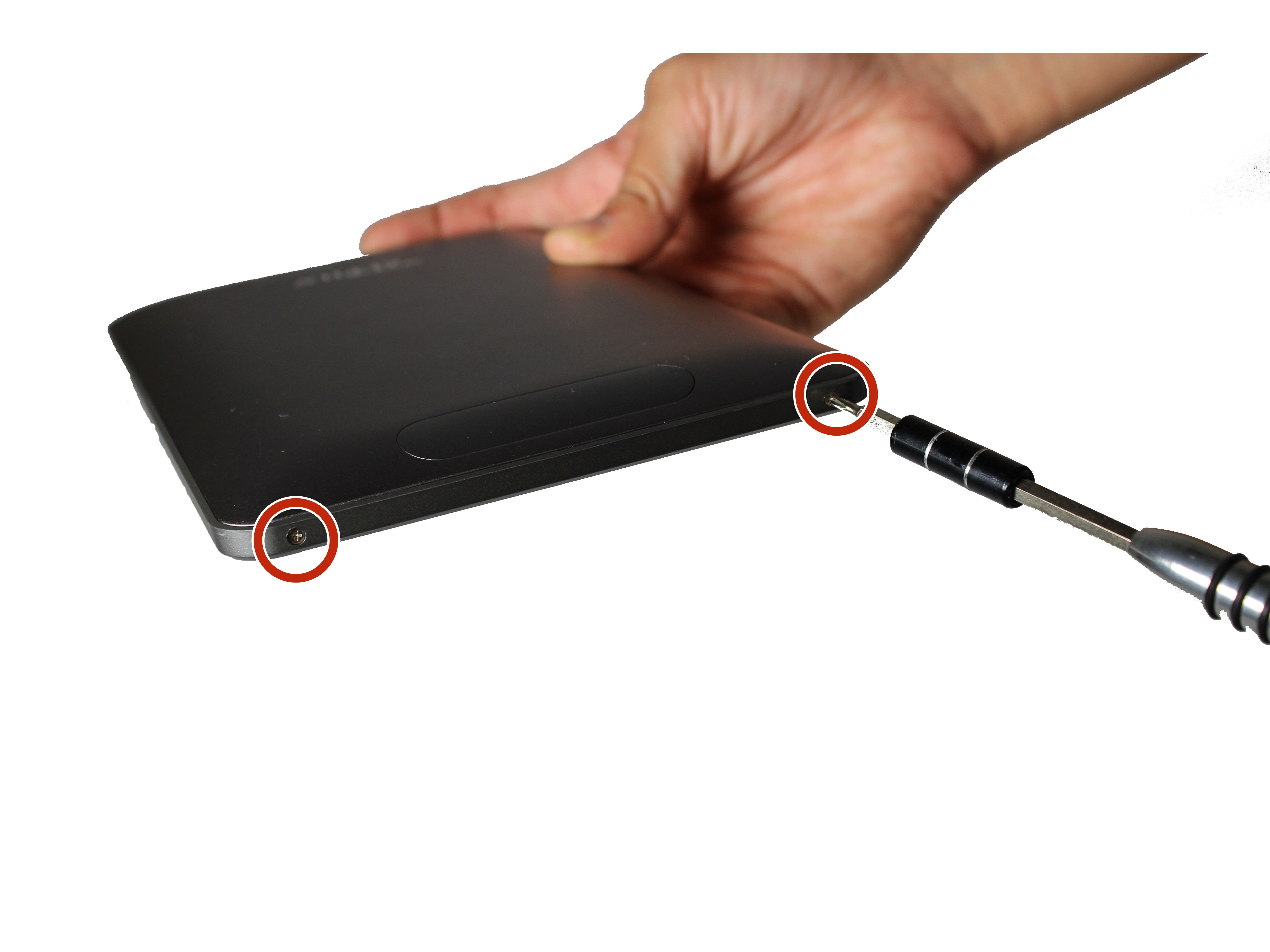
  • Remove the (4) 3.5mm screws using a phillips #000 screwdriver.
Step 3

Repair step

  • Use the plastic opening tool to work your way around the tablet, releasing the back case from the tabs.
Step 4

Repair step

  • Release the back case from the rest of the tablet with your hand.
  • Do not pry the case too hard; doing so can damage the tablet.