FIXONIC
SellSavedMy Fixonic
Official iFixit API visual reference

Tagital T9X Volume, power, or return button Replacement

This guide will show how to replace the volume...

iFixit Library Tagital T9X Easy 10 - 20 minutes Guide 56648
Open the authorised source
Licensed iFixit integration

This attributed iFixit guide is displayed through Fixonic's recorded commercial API permission. iFixit remains the independent source and author of the procedure.

Guide overview

Before you begin

This guide will show how to replace the volume button on your Tagital T9X tablet.

Step 1

Repair step

  • With the tablet turned off, remove the two 5mm Phillips head screws from the top of the tablet.
  • These screws are extremely easy to lose. Be sure to store them in a safe place.
Step 2

Repair step

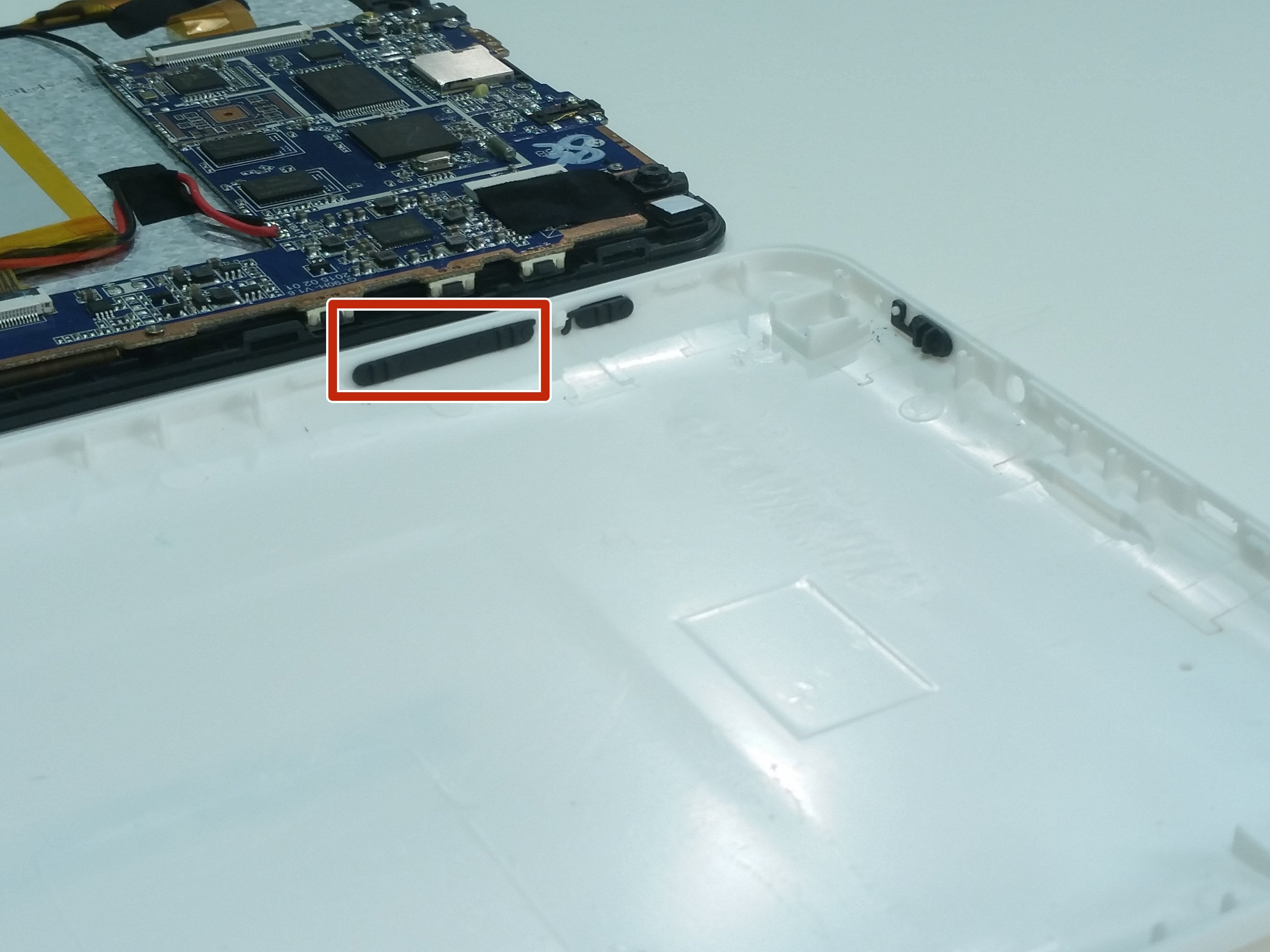
  • Use a 1 cm wide plastic opening tool to remove the back panel. Go around the entire back panel to ensure safe removal.
  • The power, return, and volume buttons are not firmly secured to the panel; it is likely they will fall off in the process of removing the panel.
Step 3

Repair step

  • Remove the broken volume button from the plastic case. Replace it with the new volume button, with the + being closer to the camera opening.
  • There are two other small buttons that look very similar to one another; if they fall off as well, put them back in their rightful place.