
FIXONIC
SellSavedMy Fixonic
Official iFixit API visual reference

Sony DCR-DVD 108 Case Disassembly

The following is a guide to disassemble the...

iFixit Library Sony DCR-DVD 108 Moderate No estimate Guide 60743
Open the authorised source
Licensed iFixit integration

This attributed iFixit guide is displayed through Fixonic's recorded commercial API permission. iFixit remains the independent source and author of the procedure.

Guide overview

Before you begin

The following is a guide to disassemble the camera into two primary halves. It will serve as prerequisite guide to few a other guides hosted by this page.

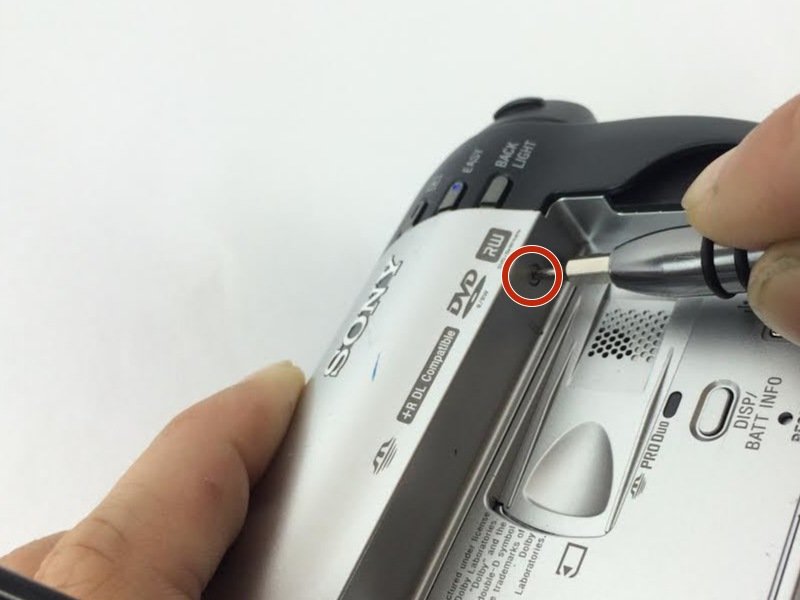
Step 1

Repair step

  • Remove all the 4.3mm screws on the bottom using a J000 Phillips screwdriver. There should be seven screws (4 silver, 2 black).
Step 2

Repair step

  • Remove the 5mm #0 Phillips screws on the underside of the LCD tuck-a-way.
Step 3

Repair step

  • Remove the 2mm #0 Phillips screw behind the battery.
Step 4

Repair step

  • Open the dvd cover and remove the 3 4.3mm phillips screws. Including ones in the corners that may be hidden.
Step 5

Repair step

  • Once all the screws are removed you can safely pry open the camera case using a spudger.