FIXONIC
SellSavedMy Fixonic
Official iFixit API visual reference

Garmin Nuvi 2557LMT Speaker Replacement

The tools you will need are a T5 Torx...

iFixit Library Garmin Nuvi 2557LMT Moderate No estimate Guide 63071
Open the authorised source
Licensed iFixit integration

This attributed iFixit guide is displayed through Fixonic's recorded commercial API permission. iFixit remains the independent source and author of the procedure.

Guide overview

Before you begin

The tools you will need are a T5 Torx screwdriver, plastic opening tool, and soldering equipment. The speaker might be glued to the back of the device and is connected to the motherboard.

Step 1

Repair step

  • Using a T5 Torx screwdriver, remove four 6 mm screws from the four corners of the back of the device.
Step 2

Repair step

  • Grip the device with your hands. Using your thumbs pull the nameplate towards yourself and off the device.
Step 3

Repair step

  • There is a visible separation between the front and the back of the device.
  • Using a plastic opening tool, pry open the device along this separation.
  • Trying to open the device on the opposite side will rip the motherboard-display connector.
Step 4

Repair step

  • Carefully pull apart the device by opening it up on the opposite side of the nameplate.
Step 5

Repair step

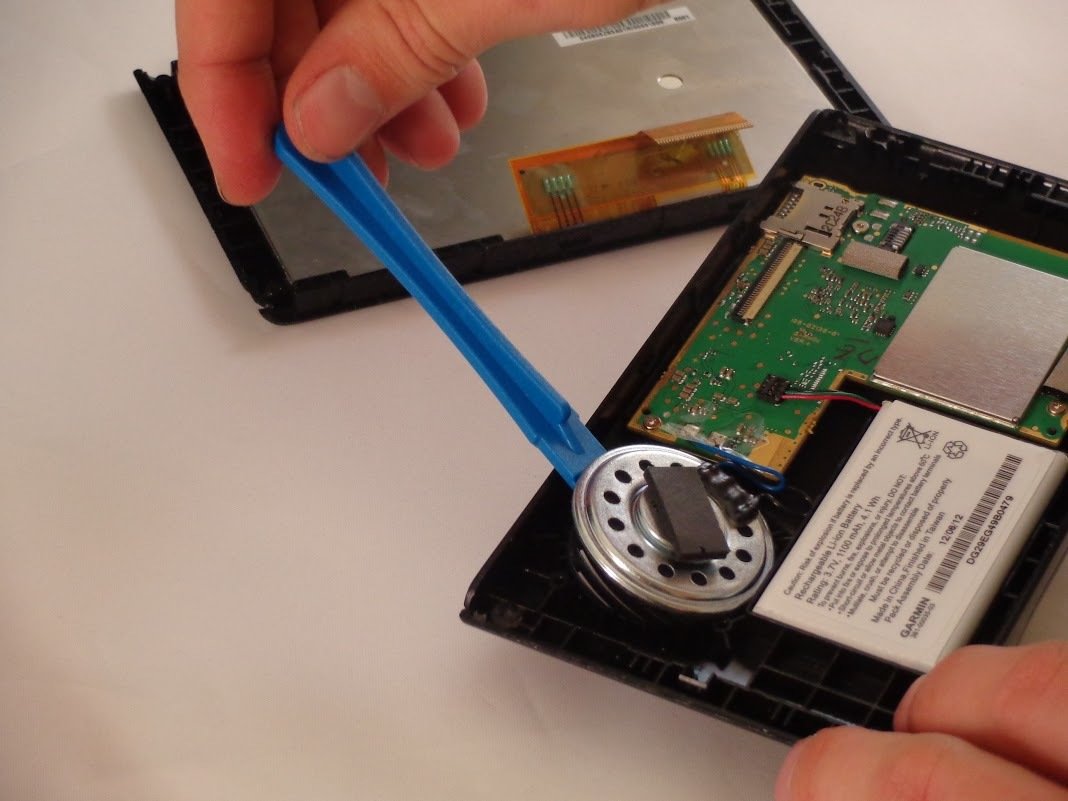
  • Using a plastic opening tool, wedge the speaker from the device.
  • Don't pull it out of the device too far. It is still connected to the motherboard wire.
Step 6

Repair step

  • Using a soldering iron, desolder the wire connection between the speaker and the device.