FIXONIC
SellSavedMy Fixonic
Official iFixit API visual reference

Visual Land Prestige Elite 7Q Battery Replacement

Complete the following guide to replace a dead...

iFixit Library Visual Land Prestige Elite 7Q Difficult 20 - 30 minutes Guide 71223
Open the authorised source
Licensed iFixit integration

This attributed iFixit guide is displayed through Fixonic's recorded commercial API permission. iFixit remains the independent source and author of the procedure.

Guide overview

Before you begin

Complete the following guide to replace a dead or failing battery in the Visual Land Prestige Elite 7Q.

Step 1

Repair step

  • At the bottom of the tablet, remove the two 3.6mm screws with a Phillips #000 screwdriver.
Step 2

Repair step

  • Wedge a plastic opening tool into the edges of the tablet to pry it open.
Step 3

Repair step

  • Peel off the yellow tape holding down the battery.
Step 4

Repair step

  • Use a plastic card to loosen the battery from the tablet. Note that it will be sticky underneath the battery.
Step 5

Repair step

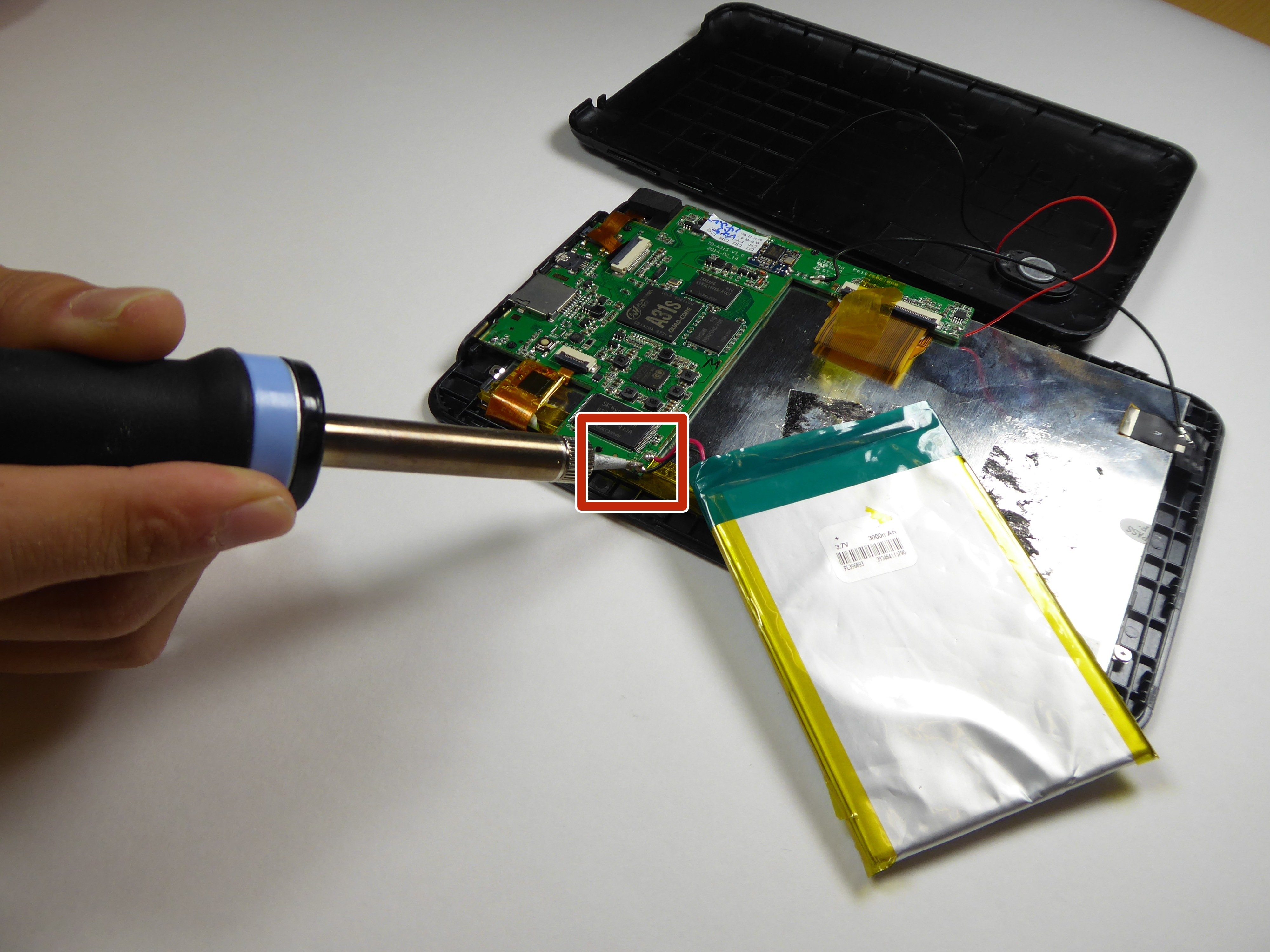
  • Soldering iron gets hot. For information on how to use a soldering iron, click here.
  • Use a soldering iron to detach the battery wires from the motherboard.
  • Replace the battery.