
FIXONIC
SellSavedMy Fixonic
Official iFixit API visual reference

Dell Inspiron 14z-5423 RAM Replacement

The RAM is a memory card that holds the...

iFixit Library Dell Inspiron 14z-5423 Easy 15 minutes Guide 72570
Open the authorised source
Licensed iFixit integration

This attributed iFixit guide is displayed through Fixonic's recorded commercial API permission. iFixit remains the independent source and author of the procedure.

Guide overview

Before you begin

The RAM is a memory card that holds the operating system and applications in order for the computer to access data.

Step 1

Repair step

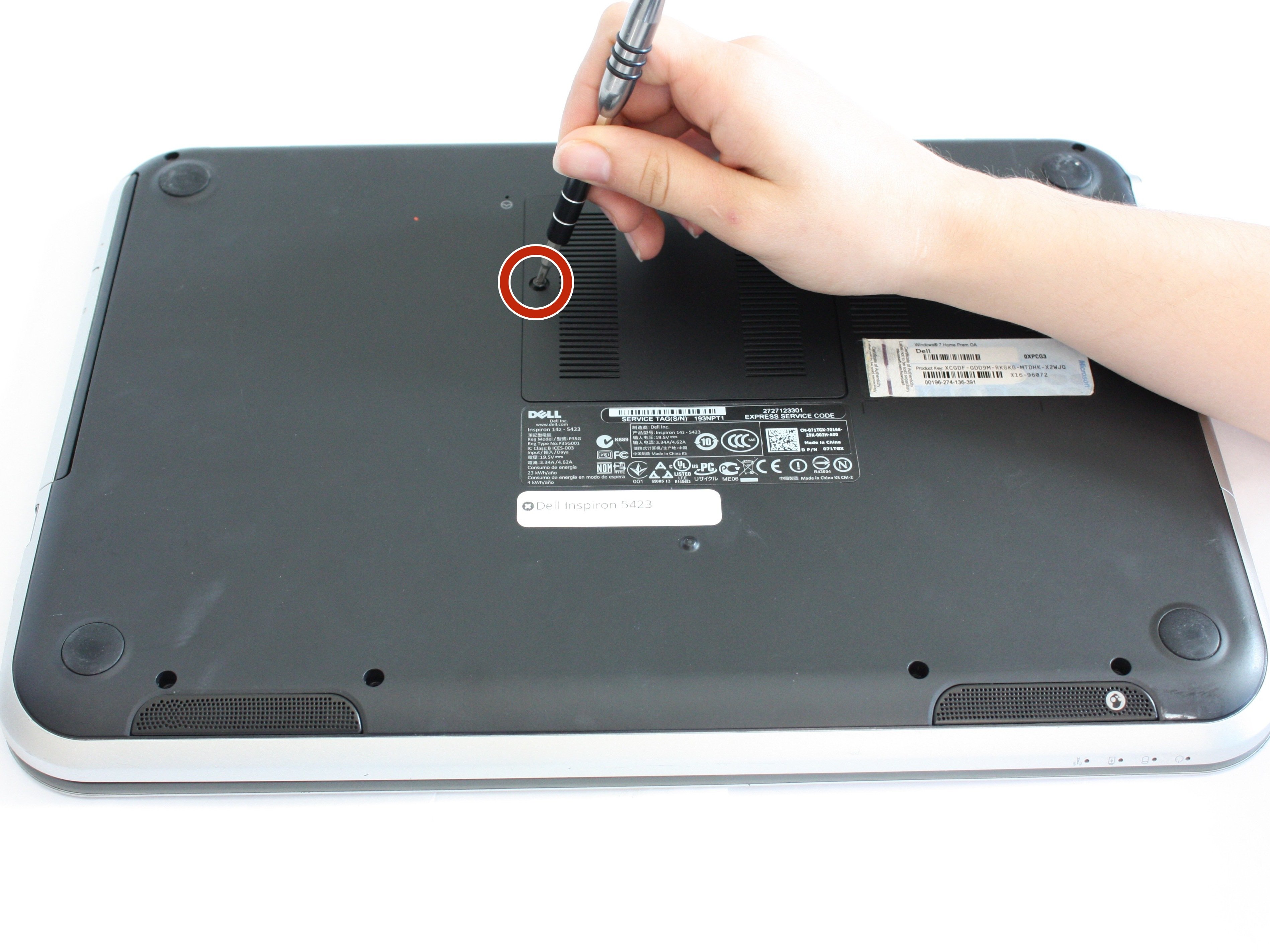
  • Close the display and turn over the computer.
  • Make sure your device is powered down and unplugged before beginning the replacement.
Step 2

Repair step

  • Use a J0 bit tipped screwdriver to unscrew the one 6 mm Phillips screw on the RAM cover.
Step 3

Repair step

  • Lightly lift the RAM cover up and at an angle, away from the computer.
Step 4

Repair step

  • Use your fingers to carefully pull the securing clips on the RAM away from each other.
  • The RAM should pop up when the clips are released.
Step 5

Repair step

  • Remove the popped up RAM by pulling it away from the connection.
  • If it does not pop up pry it out in a steady and straight direction.