
FIXONIC
SellSavedMy Fixonic
Official iFixit API visual reference

How to check the Battery Voltage in your BMW E38 E39 X5 E46 using the BMW Instrument Cluster self check feature

A good place to start on understanding the BMW...

iFixit Library 1997-2003 BMW 5 Series Very easy 1 - 3 minutes Guide 7617
Open the authorised source
Licensed iFixit integration

This attributed iFixit guide is displayed through Fixonic's recorded commercial API permission. iFixit remains the independent source and author of the procedure.

Guide overview

Before you begin

A video about checking battery voltage in BMW E39 http://www.youtube.com/watch?v=z4Kk3Q5co.... A good place to start on understanding the BMW Battery System is the BMW Technician Training Document on BMW Battery System BMW Battery Information Document

Step 1

Repair step

  • Turn OFF Car.
  • Turn ON high Beam headlights for 5 minutes. This removes the surface charge for proper testing.
  • Turn OFF High Beam headlights.
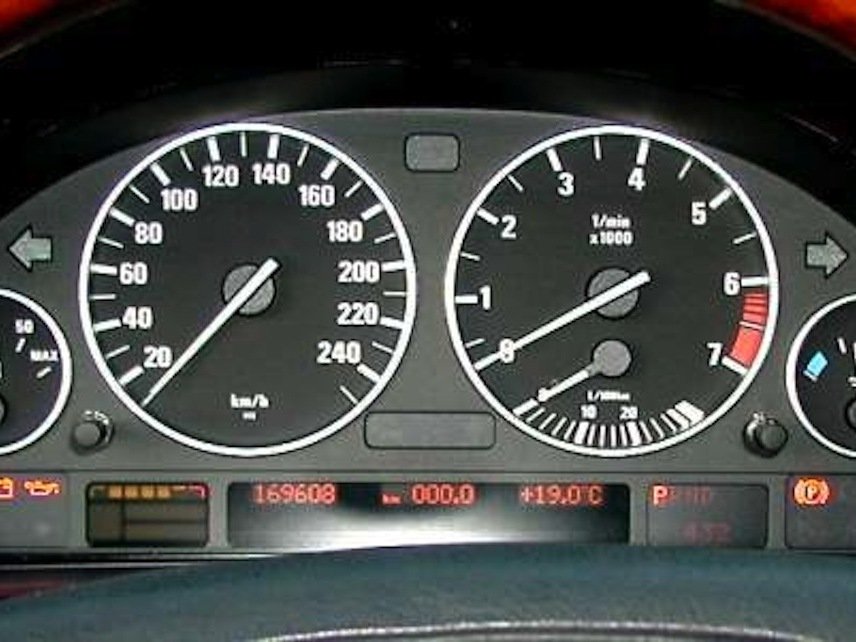
  • Press and hold the Check Control button in the instrument cluster (RIGHT button), and turn the ignition key to the first position (KLR).
  • You will first see "Check Control OK", some seconds later you will see "Test Nr.01".
  • Select Test Number 1. by Pressing the left button on the instrument cluster to see the car's identification number. Add the 5 digits (not 6)
Step 2

Repair step

  • Add up the digits Example: A123457 will lead to 2+3+4+5+7 = 21.
  • Push the right button until you see "Test Nr.19".
  • Enter the total amount calculated above into this menu item using the LEFT button. When complete press the right button again. This will unlock your instrument cluster giving you full access to all of the test modes
  • Using the left button select Test Number 9. System Voltage.
  • Press the Right button to select. Your battery voltage will show on the High Cluster until you turn the car off again