FIXONIC
SellSavedMy Fixonic
Official iFixit API visual reference

HP Pavilion x360 m3-u001dx USB Port Shield Replacement

Attributed iFixit repair guide for HP Pavilion x360 m3-u001dx.

iFixit Library HP Pavilion x360 m3-u001dx Easy 5 - 6 minutes Guide 77460
Open the authorised source
Licensed iFixit integration

This attributed iFixit guide is displayed through Fixonic's recorded commercial API permission. iFixit remains the independent source and author of the procedure.

Step 1

Repair step

  • Shut down the computer.
  • Disconnect the power and all external devices connected to the computer.
  • Working on your device while it is turned on may result in electric shock.
Step 2

Repair step

  • Use a Metal Spudger and remove the rubber foot closet from the bottom of the laptop.
Step 3

Repair step

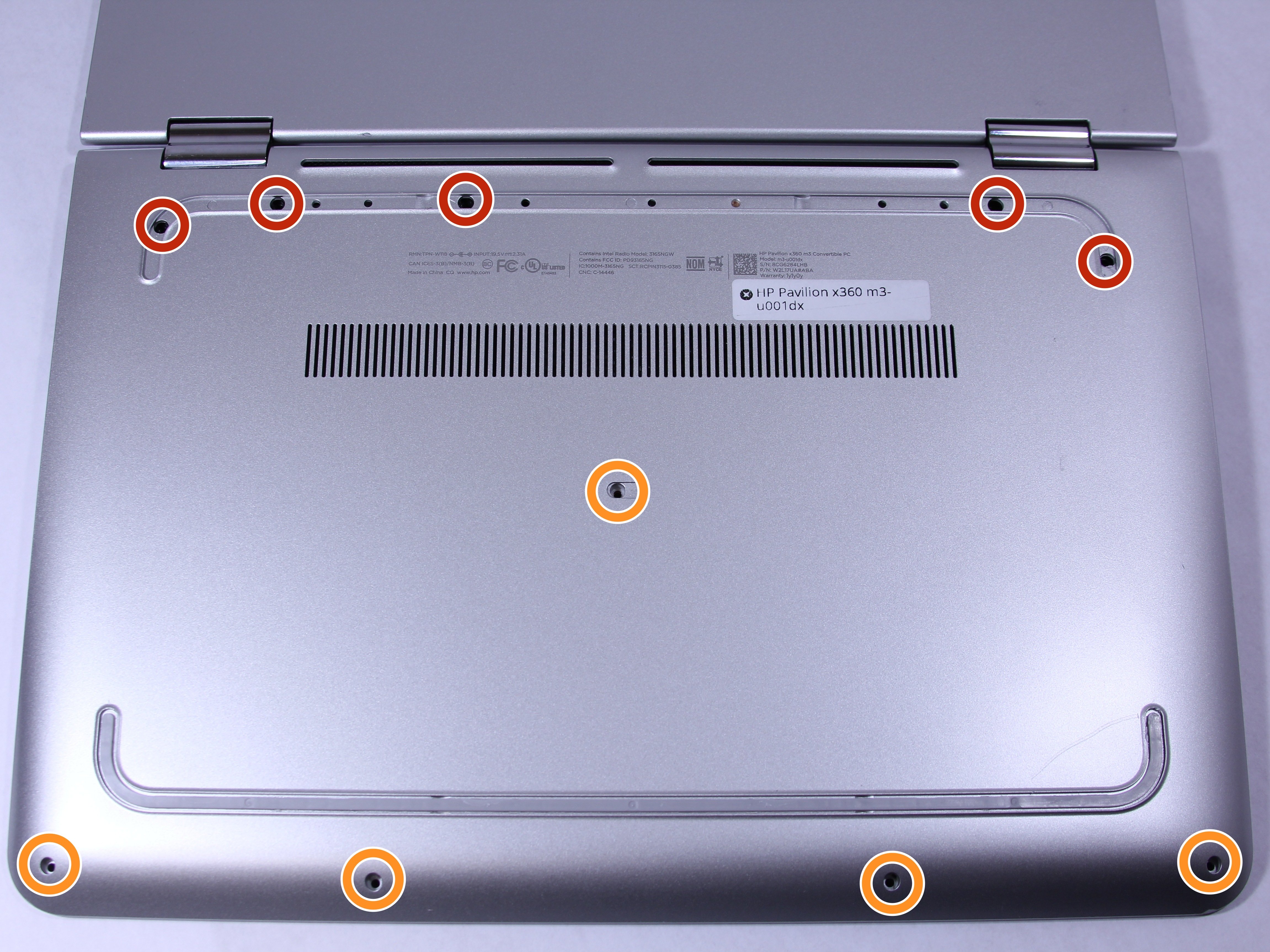
  • Remove all of the screws located on the bottom of the laptop:
  • 5 Phillips 2.4 x 5.7 mm screws
  • 5 Phillips 2.0 x 5.0 mm screws
  • Make special note of each screw and screw lock size and location during removal and replacement.
Step 4

Repair step

  • Turn the computer over onto its base, with the computer open and the keyboard facing upward.
Step 5

Repair step

  • The keyboard is attached internally by clips. Use a small amount of force when removing the keyboard.
  • Use the Plastic Opening Tool to separate the keyboard from the base of the laptop.
Step 6

Repair step

  • Raise the keyboard slightly to access the touch pad and keyboard cables.
  • Raising the keyboard too far or with excessive force may cause damage to the keyboard, touch pad cables, or their connectors.
Step 7

Repair step

  • Disconnect the ribbon cables attaching the touch pad and keyboard to the system board (motherboard).
  • Using the Heavy-Duty Spudger lift up the plastic locks connecting the ribbon cable to the motherboard.
  • Use the blue plastic tab on the ribbon cable to pull it out from the lock on the motherboard.
Step 8

Repair step

  • Lift the keyboard away from the base of the laptop.
Step 9

Repair step

  • (You don't NEED to remove this shielding as you can remove the board with it still there.)
  • Remove the adhesive strip.
  • Lift the shield away from the base of the laptop.