FIXONIC
SellSavedMy Fixonic
Official iFixit API visual reference

DeWalt DW936 Plastic Cover Replacement

This guide will show you how to take off the...

iFixit Library DeWalt DW936 Moderate 10 minutes Guide 78064
Open the authorised source
Licensed iFixit integration

This attributed iFixit guide is displayed through Fixonic's recorded commercial API permission. iFixit remains the independent source and author of the procedure.

Guide overview

Before you begin

This guide will show you how to take off the plastic cover on the saw, so you can get to the inside components.

Step 1

Repair step

  • Use a T-20 hexhead screw to unscrew 4 hexagonal screws surrounding the base of the black air filter. The screws are on the yellow portion.
Step 2

Repair step

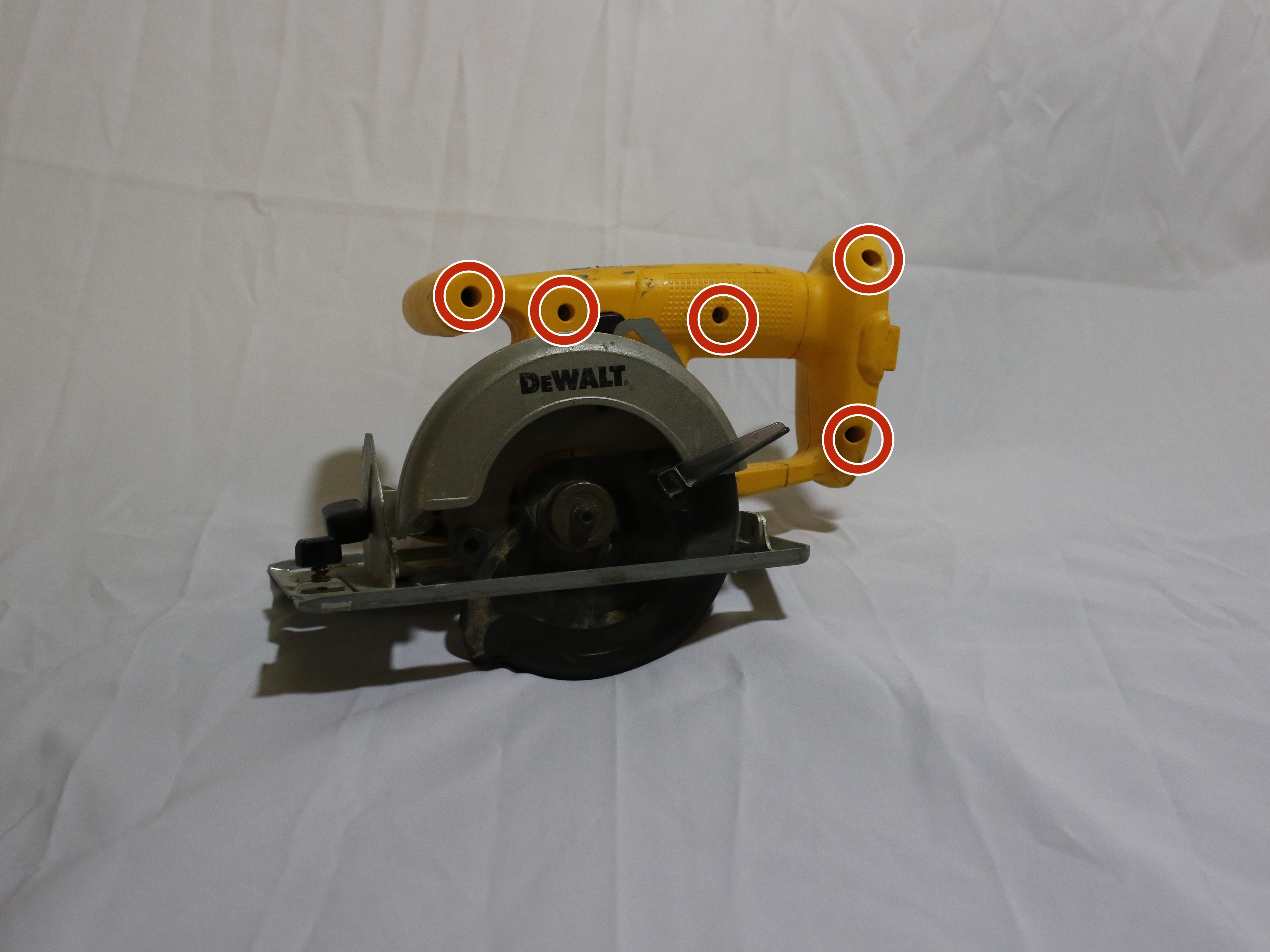
  • Use a T-15 hexhead screw to unscrew 5 hexagonal screws. These screws are located on the opposite side of the saw from previous step.
Step 3

Repair step

  • Remove Allen Key.
Step 4

Repair step

  • Unscrew the black plastic knob underneath the trigger.
Step 5

Repair step

  • Grab hold of the black air filter portion and pull off.
Step 6

Repair step

  • This is what the inside of the saw looks like.