FIXONIC
SellSavedMy Fixonic
Official iFixit API visual reference

Huawei SnapTo G-620 Battery Replacement

If your Huawei SnapTo G-620 fails to charge the...

iFixit Library Huawei SnapTo G-620 Moderate 5 - 10 minutes Guide 98583
Open the authorised source
Licensed iFixit integration

This attributed iFixit guide is displayed through Fixonic's recorded commercial API permission. iFixit remains the independent source and author of the procedure.

Guide overview

Before you begin

If your Huawei SnapTo G-620 fails to charge the battery may need to be replaced. This guide shows how to replace your SnapTo's battery.

Step 1

Repair step

  • Pry open the back cover with your fingernail, using the divot to the lower left hand corner.
  • Remove all fifteen 4mm Phillips J00 screws on the back panel.
  • Using a metal spudger or your fingernail, remove the back panel.
Step 2

Repair step

  • Remove the pictured 4mm Phillips J00 screw.
Step 3

Repair step

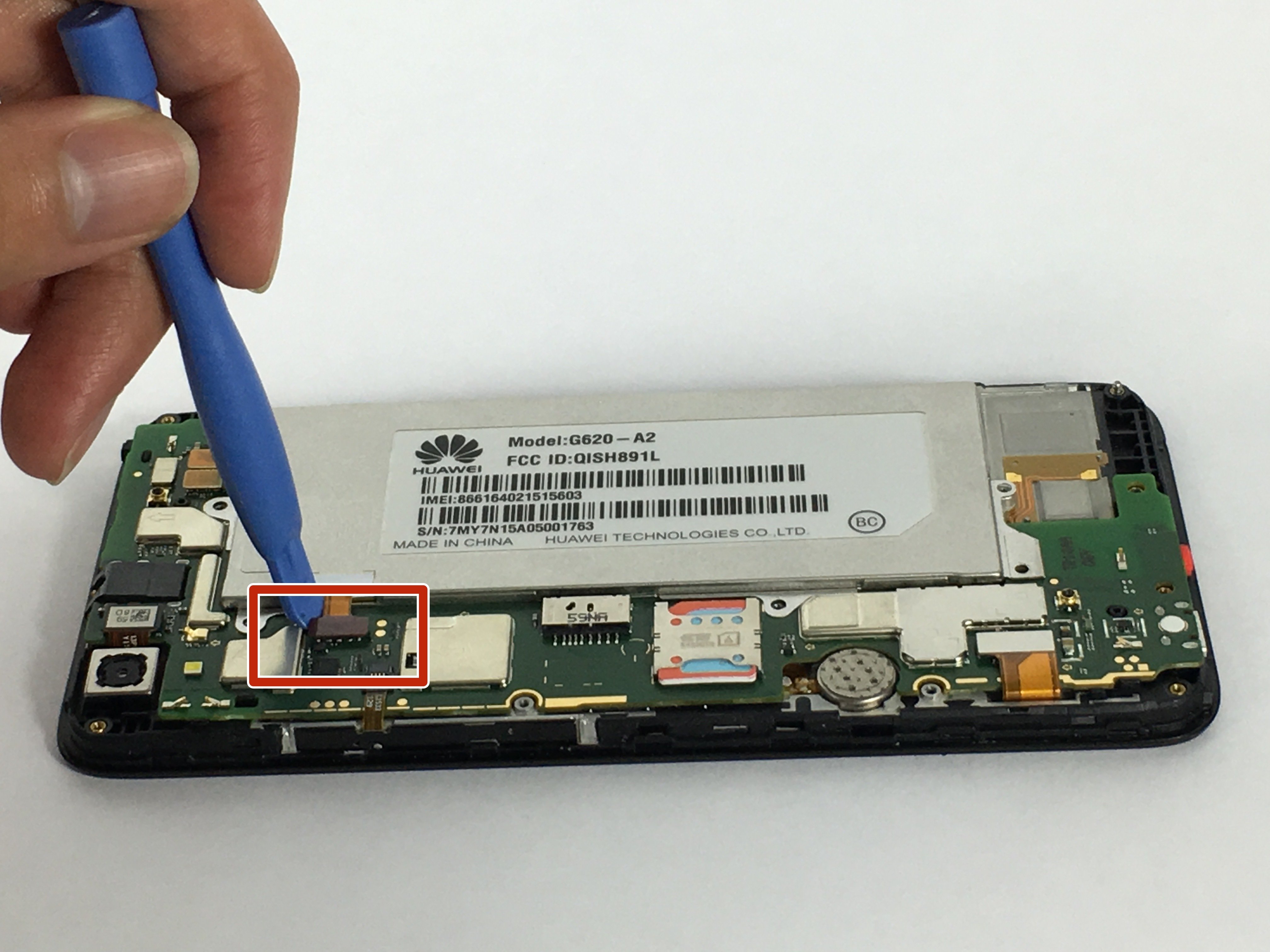
  • Use a plastic opening tool to remove the pictured flat-top connector.
Step 4

Repair step

  • Remove the battery.